28 January 2016

NatGeo CNG image converter

Love geography? or you have downloaded their free huge magazine scans library? then you may interested in this tool from http://diplograph.net/posts/decoding_the_complete_national_geographic_images

In short cng2jpg de-obfuscate NatGeo's jpg files (lossless operation).

This is win32 version of C commandline application by Paul Knight, I just change the filemode to make windows version work.

cng2jpg.7z 11Kb

Alternatively .NET GUI application available at https://github.com/keithn/cng2jpg/releases

23 January 2016

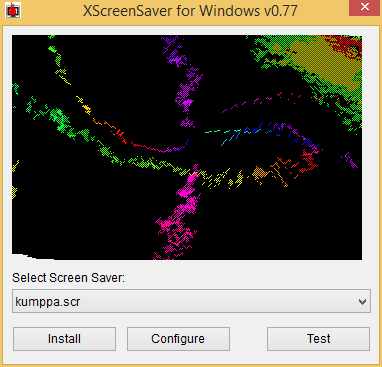
Alternative build for XScreenSaverWin

I found great screensaver port from Linux at http://katahiromz.web.fc2.com/xscreensaverwin/eindex.html contain more than 200 screensavers. Okay that's a LOT, in fact Windows will only list the first 100. Fortunately it come with random.scr which is a screensaver loader.

About half of them are opengl accelerated and with some of these I have error when exiting. I made minor workaround for that error which a least works for me. I also made minor modification in the directory organization so that all screensaver goes to one folder. This way the folder can be copied to Windows folder and random.scr loader can be placed in system32/syswow64 to minimalize "pollution".

Here is the download and modified source
version 0.77
XScreenSaverWin32.7z (2.74 Mb, 220 Screensavers)
XScreenSaverWinSrc.7z (2.71 Mb, VS 2008 Source)

I wonder if there is a MyPaint brush like that?


16 January 2016

How to download from sourceforge when it goes down

Many probably aware about SF's occasional hiccup while it usually don't last long it could be annoying when you're in hurry. There are several SF official mirror that allow you to enter their file server through classic http file index, all you need to know is the project name (that used in the url). Some of them do not support direct access though.

just name a few:
http://jaist.dl.sourceforge.net/project/[projectname]/
http://iweb.dl.sourceforge.net/project/[projectname]/
http://heanet.dl.sourceforge.net/project/[projectname]/
http://liquidtelecom.dl.sourceforge.net/project/[projectname]/
http://tenet.dl.sourceforge.net/project/[projectname]/

But that's just the usual links isn't it? yes, the trick is the last trailing slash, otherwise it will redirect to sourceforge webfront and not all mirrors support this trick.

Hosting behavior also varies, some purge old downloads after period of time, some may have different interface (different web server).

There are also many alternatives mirror/access url from google search

for example:
http://www.mirrorservice.org/sites/ftp.sourceforge.net/pub/sourceforge/n/n7/n7xmaslist/

but those tend to have inconsistent url path pattern and lengthier.


Basically, you could always provide true direct link if you have too! (skipping all those ever crowded dodgy ads if you wish to)

For those not realize it yet, I hope this helped

15 January 2016

8 Songs bundled with Windows

Windows that released during 2001-2010 have bundled songs. That is the home multimedia era, now with everything moved to cloud Windows 8 and later no longer bundling songs.

Here is the list of songs that I know:

XP:
Windows Welcome music by Microsoft
Like Humans Do (radio edit) by David Byrne
"Highway Blues" by New Stories
Symphony No. 9 (Scherzo) by Ludwig van Beethoven

2003:
No Hay Problema by Pink Martini

7 (Vista?):
Maid with the Flaxen Hair by Richard Stoltzman
Sleep Away by Bob Acri
Kalimba by Mr. Scruff

Apparently Microsoft aren't interested in mainstream genre such as Pop or RnB. I like that attitude!

Windows 10 is

I found handful information about Windows 10 from google since I unable to get a hand of it (neither I want to download it, mind you I killed B.I.T.S on my Windows 8.1)

Windows 10 is yours to enjoy – and absolutely free
Windows 10 is designed to be compatible with the hardware, software, and  peripherals you already own
Windows 10 is familiar and easy to use, with lots of similarities to Windows 7 including the Start menu
Windows 10 is now running on more than 200 million devices
Windows 10 is a personal computer operating system released by Microsoft as part of the Windows NT family of operating systems
Windows 10 is here to change the game
Windows 10 is spying on everybody, and it's all thanks to Microsoft itself
Windows 10 is so familiar and easy to use, you'll feel like an expert
Windows 10 is a free update, making it easier for Microsoft to push the new operating system
Windows 10 Is Tracking You
Windows 10 is an entirely new version of the veteran Windows operating system – a version that is make-or-break for Microsoft
Windows 10 is off to a good start
Windows 10 is an operating system from Microsoft Corporation for servers, desktop PCs, laptops, tablets, phones, and other connected devices
Windows 10 is only free for one year
Windows 10 Is Randomly Deleting Programs, Files, Associations
Windows 10 is Great, Except for the Parts That Are Terrible
Windows 10 is for suckers
Windows 10 Is Malware
Windows 10 is collecting more information than some people may have realized
Windows 10 is specifically designed to give Microsoft a much wider and much tighter grip on consumers
Windows 10 is quickly replacing previous versions of Windows in the enterprise
Windows 10 is harvesting more of YOUR data than any other Microsoft operating  system
Windows 10 is a Broken POS
Windows 10 is not hugely different from Windows 8
Windows 10 Is Catching Up to XP
Windows 10 is doing well overall, and far, far better than Windows 8 as Microsoft hoped
Windows 10 is the best version yet – once the bugs get fixed
Windows 10 Is the Product of a Chastened, Changed Microsoft
Windows 10 is nice
Windows 10 is actually pretty awesome
Windows 10 is 'the last version of Windows'

Let say it's about 75/25 of pros/cons opinion. My take I think Windows 10 will doing OK for Home consumer but failed for business and enterprise unless major changes made. Seriously this "one OS for all" just ridiculous.

Not that I hate Windows 10, I think I can use Vista, 7 or 8 (been 2 years now) just fine. However in term of *Personal* Computer Operating System, XP is the one better. My analogy goes like this:

XP is your dog: Maybe primitive but obedient and loyal though will bite if abused.
Vista is your mother-in-law (connotation): Noisy and strict ready to drive you nuts
7 is your big brother: Reliable and tolerant but you hardly can talk back in an argument
8 is a hired assistant: Maybe suit you or maybe not, a stranger that harder to approach
10 is double agent Cortana: In front of you it's nice and all, behind your back it is controlling YOU.
 

Visual True Type for XP

Been years looking how to download this thing from Microsoft. Previously this was only available "by request" to Microsoft typography group or something, however it's near impossible to get a reply. Originally the program itself released circa 1999-2001 (yeah Win 9.x era and slightly updated when XP released). Now that it was made freely available https://www.microsoft.com/en-us/download/details.aspx?id=48728 (previously MS VOLT also made free and has been regularly updated). Together with other free tools in https://www.microsoft.com/typography/default.mspx are extensive font development tool for Windows. But there is one problem: VTT 6 is not for XP! geh

So I ask an anon question at stackexchange regarding backporting vista apps. I kind of expecting to get l33t answer like reconstructing IAT and some OllyDbg hacking session but it was shim method that come up. Well it was a technique commonly practiced anyway.

To summarize:
- VTT.exe need CompareStringEx and InitializeCriticalSectionEx which unavailable in XP kernel.
- Both functions available in msvcp140.dll (part of Visual C++ 2015 redistributable) with slightly different name along with other interesting backported functions
- VTT.exe is compiled with linker's osversion set to Vista (6.0)
- VTT.exe also protected with Microsoft digital signature

The shim will sit between vtt.exe and kernel32.dll+msvcp140.dll, so we could use renamed function redirection or loadlibrary way. I choose the first since there are not much of imported functions.

Basically I made shim that contain lowercase version of the function (you could use MSDN or MinGW headers to see the correct declaration) which call the actual function in kernel32.dll and msvcp140.dll for the missing one.

for example:
...
// CompareStringEx
WINBASEAPI int WINAPI __crtCompareStringEx (LPCWSTR lpLocaleName, DWORD dwCmpFlags, LPCWCH lpString1, int cchCount1, LPCWCH lpString2, int cchCount2, LPNLSVERSIONINFO lpVersionInformation, LPVOID lpReserved, LPARAM lParam);

WINBASEAPI int WINAPI comparestringex (LPCWSTR lpLocaleName, DWORD dwCmpFlags, LPCWCH lpString1, int cchCount1, LPCWCH lpString2, int cchCount2, LPNLSVERSIONINFO lpVersionInformation, LPVOID lpReserved, LPARAM lParam) {
__crtCompareStringEx (lpLocaleName, dwCmpFlags, lpString1, cchCount1, lpString2, cchCount2, lpVersionInformation, lpReserved, lParam);
}
...

and compile with:
gcc -shared -Wl,--kill-at -o vttforxp.dll vttforxp.c -L. -lmsvcp140 -s

Next we need to rename imported functions in VTT.exe to lowercase too (yeah kind of risky here) and rename kernel32.dll to vttforxp.dll, we can use hex editor.

Next we remove the digital signature, since it obviously become invalid now. we can use osslsigncode:
osslsigncode remove-signature -in vtt.exe -out vtt.exe

Next we need to downgrade os.version PE header to 5.1 (XP). we can use editbin or pehdr-lite
pehdr-lite vtt.exe -osver 5.1 -subsysver 5.1

As a bonus step, we can use Microsoft mt to add xptheme manifest

That's it! Well of course this case is rather simpleton but still is a real-world case :)
heck some apps even simply set the higher os.version (due to never compiler default) so that it could spew stupid error message like "invalid win32 application"...


31 December 2015

Cloudy PC Future

A post at the end of year should be about the future :). Guess wee all know how bad PC business right now, only goes to decline eaten by mobile device platform and more company start looking for an exit. At least what I always complain inevitably become a trigger. The conspiracy (or rather that's how business work) between hardware vendor and software vendor can't last forever. XP is one of the evident, how hard MS try to shut it down and yet Windows 10 sales has been predicted as "temporary relief" for PC sales' ongoing decline.

What happened to mobile device market now is "the re-invent process of PC in another form". Back in early 2000's I still read CPU speed war, even CISC vs RISC was relevant though most RISC died shortly killed by commodity x86 CISC then it was multi-core x86 war. Windows make it relevant by having more background services (bundling stronger firewall, AV etc), software framework has been in higher level with  more layer added after layer, all to make multi-core utilized. No doubt current mobile device usability is more or less like PC we have in early 2000s (but with more connectivity) thus still has huge room for improvement, more profitable. PC are stuck, x86 CPU makers either go green and challenge ARM or focus to server and cloud data services leaving high-end CPU/GPU to niche market such workstation (Scientific/Labs, 3D, HD-Video) and desktop gamers. How far general-purpose software company will "keep it bloated, keep it changed" I think it will backfired.

PC Software sales also declining, have been seeing more and more (supposedly) high-end software offered as freeware by misfortune or as a bait. For example Fusion, I wonder if youtubers will use it to enhance their video :-), MS even release (and to some extend discontinue) more freeware than ever before. All start to shift to services as the main revenue. However company such Autodesk (arguably monopolize 3D, CAD and DCC) may continue sell outrageously and less affected by declined PC demand so does Game publisher. With more commercial turned to freeware and more HQ opensource software available, these freebies will give commercial offering hard time in the future.

Cloud software is no less susceptible to conspiracy especially those company who own *both* online apps and browser technology (Adobe got AIR/Flash). They keep pushing the limit on their own pace, deprecating others on the way. Make sure the users believe they should make a switch and they bloat the software as they bloat their online apps so that hardware maker can make super computer solution for our colorful online "experience". It's the same business pattern again, won't be surprised if there would be a leaner and more standard solution by OSS but right now LibreOffice is busy conquering the traditional market.

Sometime we often forgot that most of the tasks we do are basically the same, only how we doing it that changed. Who knows if the old adage "If it ain't broke, don't fix it" will become louder? but generation always have their times, I meant nowadays it rather non-sense to ask youngsters if they can operate PC when they had android/iPhone to begin with. In world-wide context the kind of technology (tablet, smartphone or traditional PC) being adopted will get more diverse than ever, depends on what they can afford.
 

09 December 2015

How to repack Visual Studio 2010 Express for SVCPACK installation

VS 2010 is the last for XP so I want to have convenient up-to-date package that I can slipstream into XP iso.
Firstly this post http://www.itninja.com/question/visual-studio-2010-express have all the ingredient for us to cook. Lets go!

- Extract all Ixp*.exe file with 7zip (ignore the warning).
- Make admin installer from each extracted vs_setup.msi (msiexec /a)
- Edit each of administrative version of vs_setup.msi with Orca:
  - Remove CA*LaunchCondition in all Install*Sequence tables (to allow running and updating)
  - Remove *SETUP entries from all Feature* tables (to remove copy of the whole cabinet installer)
  - Remove entries with CSETUPMM directory from Component table
  - Replace PIDKEY in Property table with your serial (without hyphens)
  - In Registry table find "UninstallString" (on first occurrence) and replace value of "SOFTWARE\Microsoft\Windows\CurrentVersion\Uninstall\[ProductName]" with "MsiExec.exe /X[ProductCode] "also remove its "UninstallPath" entry
- Save your edited vs_setup.msi
- Now you can remove all files in root except vs_setup.msi and remove CSETUPMM folder from "Program Files\Microsoft Visual Studio 10.0"
- Apply all applicable updates (SP1, etc) into vs_setup.msi (use the *msp file from VS10SP1*.exe )

Beware about your OS situation (.NET version, MSI, etc) cause after this you're on your own.

In my test compressing all (C++, C#, VB, Web Developer and its dependencies) with 7zip produce just about 150MB! Quite a saving eh

Edit:
- After merging patches we need to reset the package-code (Orca View > Summary) with the original one (and change the description as well if you wish)

29 June 2015

SWFDec Windows

Not to be confused with SWFDec = SWF Decompiler, this one is decoder http://swfdec.freedesktop.org. And it is not that I interested in the player itself (Flash will soon die) but rather the fact that it use cairo canvas so it can export its rendered scene to SVG/PDF easily.

Swfdec itself need little patch for Windows because of its local file URI mangling. This tool is the inverse of svg2swf and based on existing swfdec-thumbnailer (swfdec-gnome). It still ongoing, I want to make it more like rsvg-convert plus ability to set particular timeline to snap but at moment it just convert flash movie up to version 7 (version 8 or 9 may crashed) into pdf, ps, png or svg. The final version would be included in the Converter homepage here.

Command: swfdec-convert [-s minimum width/height] input output
Download: swfdec-convert.exe 1.6 Mb

24 June 2015

Windows version of djvudigital

Long time no write.. didn't meant I'm not around. This post is yet another prove that I'm a faithful Windows user :-). Admittedly I have using Windows 8.1 for months now, and damn what a buggy explorer!

You probably heard about djvu format about 5 years ago. But it kinda failed to gain momentum against the venerable PDF. Despite its rather simple (or rather "sufficient") feature, it meant to be less malice format than PDF.

Djvudigital has been around with no cmd batch port... its Ghostscript driver also a bit controversial (for linux zealot). But in this windows world anything is good as long as it apparently works. duh

This batch of djvudigital is converted into exe for convenience and will act just like batch file (aka it *need* cmd) see "BAT to EXE" page for info. It not complete port of bash version but parameters is the same as linux one, note:  it doesn't do sanity check of the Ghostscript executable whether it support djvu or not.

Requirements:
- Ghostscript with djvusep device
- Csepdjvu (part of djvulibre)
- and off course working CMD
- optionally gzip or 7za/7z

Installation:
Put all executables above in the same directory as djvudigital, you may put it in your PATH environment so you can called it anywhere. Type djvudigital --help for manual

Download:
djvudigital.exe 83 Kb

I've been using/abusing online-convert.com for a while for on-the-fly 'downversion' stuff from the internet, but no djvu there.