Showing posts with label windows. Show all posts

28 August 2022

Age of Mythology Extended Edition in Windows XP

Five years ago I made xompie (which is nothing original) and one of its part is wined3d, but sadly because of my Intel HD has crappy OpenGL driver, wined3d never really works for me.

Now replacing my old ivybridge mobo with another ivybridge (optiplex 7010) mobo with 16GB and nvidia GT 730, I could run AOM EE with wined3d.

aom ee run in xp

basically just need d3d11.dll, wined3d.dll, dxgi.dll and gdixp.dll dropped in the game directory, but the developer add OS version check in aomx.exe which I think could be solved with MS Application Verifier that lies about windows version, or else using IDA I found the game filter out OS that older than NT 6.0 (Vista need SP2 for DirectX 11), patch can be peformed using hex editor at offset 1618813 by changing 06 into 05 (the version major) now it will filtered out anything older than Windows 2000. Also aomx.exe has PE subsystem version of  6.0 so we need to fix that to 5.0 as well.

Additionally it appears that cursor initial coord by wined3d is wrong, therefor mouse has offset. This only happen in fullscreen mode. To fix it we could create override config file in .\startup\user.cfg and put these lines:

xres 1280
yres 720
+window

That's it. well I'm not really a gamer but if there is a game that I play a lot in the past that would be Age of Mythology.


20 July 2022

Final EOL of Java 7 download for Windows 32-bit

 As pointed out in Oracle blog: https://blogs.oracle.com/java/post/java-se-7-end-of-extended-support-in-july-2022

The final update for Java 7 has been released, one of openjdk vendor (probably the only one) Zulu provided installer (and zip) for 32-bit Windows:

https://cdn.azul.com/zulu/bin/
look for zulu7.56.0.11-ca-jre7.0.352 or zulu7.56.0.11-ca-jdk7.0.352, both 32-bit and 64-bit provided, and are compatible with XP too, make it theoretically most "secure" java for this platform assuming your jar can run with it.

25 December 2021

Lightweight PDFium based reader

For a long time the best lightweight PDF reader for XP is SumatraPDF 3.1.2 which based on MuPDF. There is  alternative such poppler/xpdf and ghostscript, all of them use rather unfriendly GPL-like license. PDFium which used within Chromium is new BSD license or APL 2.0 but has crude packaging (typical of google).

I stumbled on https://github.com/vfr/UXReader-Windows a nice pure Win32 API UI library for pdfium, then made little quick change on UXReaderMainWindow.cpp: commenting ChangeWindowMessageFilterEx (which break XP) and add simple argument passing using CommandLineToArgvW so it now will open file from association / cmdline. Note that it's just a barebone demo for the library but IMHO suck less than FoxIt reader. I mean whats the point having a light renderer if you bloat everything else.

Campared to MuPDF I think it's faster (and smaller too), still when rendering image-rich page with multiple overlays and transparency nothing beats Adobe Reader!

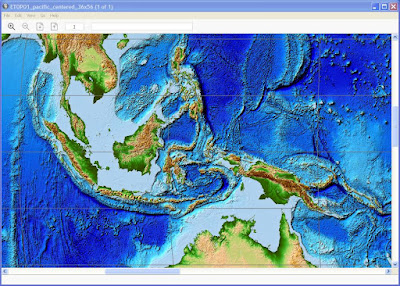
opening large ETOPO map

download: UXReader.7z (1.6 MB) require VC++ runtime 2017

24 December 2021

Python 2.7 and TLSv1.3

Python 2.7.18 is the last bugfix version of any python that officially support Windows XP. By default those trying to build it on Windows will need openssl 1.0.2 per preconfigured VS2010 project file, that mean TLS 1.2 at best for you. However as we know, the patch to support TLS 1.3 also landing on 2.7.x line all you need is to build hashlib and ssl module with openssl 1.1.1 or preferably 3.0.x header and import libs (so you can update the dll in the future). 

To do so, basically remove libeay and ssleay projects from the solution and remove them from being listed as dependency of _ssl and _hashlib project. 

Put openssl 3.0.x header directory "openssl" into [root]\externals\openssl-1.0.2t\include32 

Rename the import lib of openssl 3.0.x into libeay.lib and ssleay.lib respectively and place them at [root]\PCBuild.

Build haslib and ssl module as usual.

To see if your python has TLS 1.3 you can use ssl.HAS_TLSv1_3 boolean to make sure they are compiled properly, note that with openssl 3.0.x there are a lot of deprecated warnings but no error. Be sure to put libcrypto-3.dll and libssl-3.dll in either DLLs subdirectory and anywhere in %PATH% environment.

my build can be found here https://sourceforge.net/projects/xpitory/files/python/

Since openssl is dynamically loaded it's preferred to be compiled with MSVC 9 (as is python 2.7) though I rarely see issue of mixing msvcrt.

my personal build of openssl 3.0.1 https://sourceforge.net/projects/xpitory/files/shared-builds/openssl-3.0.1-fips-win32.7z/download

18 December 2021

Resuming XPitory

In the past, I made promise about blogging more but deliver none. This time, I'm deliver some before blog it...

20 years after XP released, it still my main windows OS and without a doubt the greatest 32-bit OS of all time.

Now with everyone start ignoring its existence, it's a good time to officially call XP the center of 32-bit retrocomputing.
A time when 2GB ought to be enough memory for anything, a time when entire OS fits in a CD and a time when people care much about making lean and mean software.

Xpitory used to be a place where I put few port for XP years ago. Now I have new goal, this would host lots of opensource software for XP. It will start by providing development toolchain first.

The plan goes like this:

1) Toolchain (compiler, VCS, make-tools)
-- Clang/LLVM 10 + GCC 10 (done, GCC still uder testing)
-- Git 2.34.1/SVN 1.14.1 (done)
-- cmake 3.20, ninja 1.9, msbuild ??, meson ?? (cmake and ninja: done, newer meson need python 3.5: done, newer msbuild need mono 6.12: not started)

2) Command-line software. Nowadays the most powerful software to tackle modern task usually available from CMD box, they are more portable and easier to port to XP.
-- FFMPEG
-- VIPS + IM
-- more

3) GUI Software. This is the harder one, framework like Qt, GTK and WX are increasingly getting away from XP, especially when they put effort on HiDPI, touch awareness and fixes for Windows 10. Other such as the lame Electron should be ignored.
There has been significant growth on Qt5-based software, so putting a working Qt 5.15 on XP is priority. QtWebEngine dependency will be avoided while QtWebkit still possible. Few software still use Qt4, putting on version 4.8.7 with all unofficial fixes and add webp support to it would be nice.
GTK 3.x will be avoided. it's slow and it is the one that technically getting farthermost away from Windows. Focus will be on porting GTK2 software instead.
WxWidgets supposedly the most windows friendly, but I'm not familiar.. will see about it.
MFC: should be no problem, as long as < VS2019 16.8
FPC/Delphi: FPC still support XP, Delphi software known to use lots of delay-load dll to check compatibility.

30 March 2021

The state of Java 8 support for Windows XP

Java 8 has complex situation on the unsupported XP. Back in early versions, the installer will warn user that it require newer windows and may not functioning as specified if user proceed. Indeed things start to break one by one, as a software platform runtime it might not obvious when it works or not that's until we ask specific broken component otherwise JVM continue on happily.

These are several component that I notice breaks on XP.

U111: the last version where JavaFX component works

U241 and U242: the last version where crypto API works (sunmscapi), newer version require NCrypt (part of MS CNG alongside BCrypt)

U261/U262: add TLS 1.3 support (jsse) and since it is related to sunmscapi it's pointless for XP, also in this version java executables no longer runnable on XP as their PE header set against NT6. It can be fixed to run on XP but doing so will break digital signature.

In my experiment we could mix newer java binary with older working component e.g. JavaFX or Crypto API, as long as they replaced as whole (dlls and jars).

Another complication, U151/U152 is the last installable version and U201/U202 is the last Oracle version which allow commercial works. On recent non-installable version user can opt to use tar.gz format (manual install) which need manual java -jar invocation from cmd prompt.

The alternative openjdk aren't that good either, so far only AdoptOpenJDK provide 32-bit binary and they dont bundle brower plugin or JavaFX furthermore all version has PE header set to NT6 so they are not runnable on XP.

Java 8 scheduled to be supported until 2026 for openjdk and 2030 according Oracle. Too bad XP version ended too soon.

AFAIK now the only still updated Java that works on XP 32-bit is IBM J9 Java 7 which can be downloaded separately from Websphere albeit not as installer (need free account login) and this will last until 2022. Not much I would say.

18 December 2020

Windows XP on the limit

 What is the maximum processor XP support?

XP support up to 2-way SMP (2 sockets), with a maximum 32 logical processor cores in total or with HT/SMT disabled up to 32 physical processor cores. XP can fully utilise SSE processor such as Intel Westmere or AMD K10 and will/may run under newer processor but wont be able to use AVX/FMA.


What is the maximum memory XP support?

Since 1995 32-bit i686 Pentium Pro 150Mhz has 36-bit PAE to access up to 64GB, in 1998 Intel provide PSE-36 driver (similar to Gavotte Ramdisk) for Windows NT 4.0 to access upper memory as pagefile. Windows 2000 has PAE built-in, original XP/2003 support 37-bit PAE (a maximum of 128GB physical memory in accordance to 32-bit Xeon processor spec at the time) and fully enabled in Server 2003 datacenter at the cost of "bad" bundled driver removal, but then "revised" to 64GB because 32-bit Server 2008 can't do 128GB, meanwhile XP SP2 restricted to 4GB with all bundled driver preserved. These limits are artificial switch based on marketing or to reflect testing result. However within 128GB only up to 16GB can be normally used, the rest addresses need AWE. Regardless each 32-bit process still limited to a maximum 4GB address space or from user perspective it is more like 2GB maximum. x86_64 CPU PAE has been varied depends on timeline and target market such 39, 40, 46, 48, and 52-bit. Fully 37-bit PAE need 980MB (for address translation) within system VAS (1024-2048MB), in this case if /3GB (4GT) or /USERVA=3072 is set then nothing is left for system, so Windows limit PAE to 16GB furthermore /3GB may negate addressable memory by AWE.

At processes level additional memory tricks available for user VAS such PE large address aware flag (in conjunction with /3GB) and AWE which is similar to PAE at user VAS level. The PE's IMAGE_FILE_LARGE_ADDRESS_AWARE flag may allow a user process to use up to 3GB, an AWE capable program can claim chunks (each less than USERVA value, up to <128GB in total) of PAE memory and get each needed chunk swapped in and out within its USERVA range (2048-3072MB). Example of AWE program is 32-bit MS SQL server, Oracle DB and MySQL 4.1-5.0 the latter capable of up to 64GB AWE memory. Another technique to overcome user VAS limit is to have multiple child processes such in Chrome browser and ABBY OCR or employ multithreaded batch processing such in ppx2, "make", etc.

Pagefile, a virtual memory that reside in storage device can be specified as 16 4GB pagefiles or 64GB in total, overall 192GB of maximum combined memory in XP. Imdisk can use AWE to create virtual disk that in turn can host all possible pagefiles and/or as mountpoint/target for %TEMP%. Just because a system has a lot of RAM (>4GB) that doesn't mean pagefile can be turned off, in fact there can only be one usable <=2GB system VAS at any time which instanced together with user VAS in every 32-bit process, thus system resource could be depleted if it cut by huge PAE mapping. Pagefile will allow system to expand some cache and pool out of the confined system VAS which at worst is about <1GB in >4GB system with /3GB. This is contrast with 64-bit Windows situation at the scale of TB VAs which more than current average size of installed system memory.

32-bit processor which has 32-bit instruction is not necessarily also has 32-bit addressing (i386-i586) it can be more such as i686 or maybe less like some i286 variant including all current x86_64 processors. Memory limit has been a moot point when talking about 32-bit OS like XP, but workaround those limitations is what make it fun.


What is the maximum disk storage XP support?

While NTFS 3.1 can go up to 256TB, other limiters make a 256TB disk impossible. XP only support MBR disk which maxed at 2TB for 512b sector or 16TB for 4k sector which need proper 4Kn controller. Dynamic disk (stripe/span mode) support up to 32 512b sector MBR disk of total 64TB agregated disk storage. Note that BIOS/NTLDR do not support booting 4Kn disk neither GPT disk (accessible through third party driver such Paragon GPT). NTFS however allow mountpoint other NTFS volume as directory to combine space though it wont change the root volume size. The fastest non-raid disk on XP is SSD either through ahci m.2 pcie 3.0 such as Samsung SM951 or through dual port SAS12G such as Seagate Nytro, both up to 2.2GB/s transfer rate.


What is the maximum XP desktop/display can be?

XP desktop is a virtual screen at 32000*32000 size with maximum exposeable area of 128 Megapixel which make it somewhat "bigger" but also smaller than GPU limit of 16k*16k. A monitor is an inset that panning over that area. The 32K limit may come from DIB format limit which is signed 2^16 integer, not sure what 128 Megapixel limit is all about as such area at 32-bit color would "only" need half GB memory however many 32-bit image viewer known to have problem displaying >100MP image, Windows Picture and Fax viewer for example could display (full size) up to 131MP. There is little freeware called sdesk that allow you to "stroll" over entire virtual screen without extra monitors.

XP can manage/arrange up to 10 monitors some say 10 is also the limit of display adapter numbers (dual-GPU card is counted as 2). Because of this dual-head display driver often capable of abstract larger monitor by pre-joining (span mode) the two before reporting to Windows thus counted as one. XP allowed different vendor driver to coexist thus enabling non-accelerated "non-sync'ed" mosaic setup of heterogenous GPUs and monitors. VGA, DVI-DL (7.92Gb/s), HDMI1.4 (8.16Gb/s) and DisplayPort1.1 (8.64Gb/s) are supported in XP, with all digital ones should be capable of 32-bit color UHD @30hz (4*3840*2160*30) or 4k @24Hz or 2560x1600 @60hz.


What latest hardware technology that XP support?

(This info compiled from driver files and not necessarily tested)

10Gbps Ethernet: Intel 82598, x520, x540; Qlogic 8140/2, 8150/2; Emulex OneConnect 1010x, 1110x; Mellanox ConnectX I (all pcie 2.0)

10Gbps SATAe: ASMedia 106se

10Gbps USB3: ASMedia 1142-3142

12G SAS3: Areca 1226, 1883 (support 4Kn)

OpenGL 4.x, OpenCL 1.x: Intel HD/Iris Gen3-Gen4 (no OpenCL driver); AMD Terascale 2 - GCN 2 (Bonaire); Nvidia Fermi - Maxwell

Wifi 802.11ac, Bluetooth 4.2: Broadcom 43xx; Realtek 88xx

13 January 2019

Theoretical Optimal Machine for Windows XP

When Windows first released in 1985, eight years later Microsoft made the best 16-bit Windows in the name of Windows for Workgroup 3.11. Then another 8 years made the best 32-bit Windows called XP and yet another 8 years the best 64-bit Windows 7 was born.

After that PC kind of hit the wall in term of hardware requirement for general users, although clockspeed has been stagnant for different reason and CPU maker has to resolve to multicore and parallelism. For the memory usage, it is not the "640K ought to be enough for anybody." case but  it is 64-bit memory addressing that ought to be enough for anybody. The problem was serious that Windows even try to backpedal, adapt and imitate the supposedly inferior (by hardware resources) mobile platform to get new users. We have been in 64-bit x86 era for 15 years and in term of memory it is far from reaching the limit. Compare that to 16-bit and 32-bit x86 era which each last for a decade.

Going back to the title, by now we may count by hand the number of new hardware driver that support Windows XP so what the optimal hardware for 32-bit XP? Hmm... I imagine:

ASUS Z9PA D8 mainboard (a)
Intel Xeon E5-2673 v2 (b)
128GB DDR3-1866 Non-ECC UDIMM (c)

Geforce GTX 980 (d)
Matrox m9188 (e)
LSI MegaRAID 2208 (f)
Creative E-MU 1616m (g)
an extra USB 3.1 Controller in PCIe :)

(a) It's ATX and fit XP limitation of Dual Processor. All onboard components support XP.
(b) XP limit: max 32 logical processors, in this case HT is enabled. Using Broadwell,  E5-2697 v4 will be optimal without HT.
(c) XP supposedly see it through 37-bit PAE and could use RRamdisk to hosts  multiple pagefiles.

(d) CUDA 6.5.19 has official driver for it, Titan X is possible with DevId injection mod.
(e) The only video card support a  lot of monitors in XDDM mode, up to 8.
(f) ASUS special PIKE module for 8 channel RAID SAS 6G
(g) Although very old this is the only with good DAC/ADC, hardware DSP and EAX/gaming compatible.


Well using later Intel generation also works, but it wont be optimal as some component such 10G Ethernet or USB3 will be unusable/disabled. With such configuration I think even 32-bit XP can do amazing task as long as parallelism achieved by multi-processes  manner such master-slave processes or jobs queue manager for optimal memory usage.

23 November 2017

Qemu for Windows XP

QEMU provide binaries for windows at https://qemu.weilnetz.de/w32/
But around version 2.8 (the builds is snapshot based) it was dropped XP support  (supposedly version 2.9 when it switched to SRWLOCK mutex thread)

I build recent qemu version that compatible with XP (32-bit) by reverting the threading model to 2.8.x version.

The build is LAA (bigmem) and fully static binary
https://sourceforge.net/projects/xpitory/files/qemu/

HAXM maybe possible using http://software.intel.com/sites/default/files/haxm-windows_r05.zip note that the installer itself wrongly flagged as NT6 executable! but you can open it using 7-zip and then use the hax.msi to install (only for XP32)

This post (and hopefully much more) will be part of XP revival effort which started at github https://github.com/tumagonx/XPitory (apparently not a viable option for long term use so I move to SF).

06 October 2016

How to use anything to generate thumbnail image of anything in explorer

Yep, that's probably idea of https://github.com/kenjiuno/ThumbGensPack/ made by japanese developer. Thumbnail generation happened in background by command-line application that feed 24bit bmp image, this non-blocking way is safer than using dll but at the cost of spawning repetition (and windows watchdog, antivirus scan and so on) delay of the generator since it's not a "server" process (for example like what RWThumbnails did).

The possibility is endless though you could generate thumbnail for text (e.g imagemagick), svg, image, audio, video, or virtually anything then piping or chaining the processes as long as it produce bmp. More importantly the shellextension works with XP :)

Give it a try!

Python 3.5.2 on XP

Got another request for PyGI AIO on Python 3.5 (and 3.6), with my previous attempt using MinGW-W64 to target UCRT failed. I'm considering to switch entirely to VS2015 for PyGI 3.22 (thanks to Fan for keep  VS project files up-to-date). However the idea of using VS2015 while online put me off.. instead I want to use EnterpriseWDK which I can confirm by compiling libintl that it does linked to vcruntime140.dll (which only contain basic support functions) with the rest probably static linked instead using those API-MS-WIN-CRT*.dll forwarder like python 3.5 do. Even if thats okay, PyGI with VS2015 will be no more that half of current packages as many still gcc oriented.

While tinkering on that I got Python 3.5.2 running on XP :-) with the help from Wine I put the fake kernel32.dll between python35.dll and the real kernel. I put it on github here https://github.com/tumagonx/xompie/

Two problem though:

0. Unlike Python 3.5.0rc which "allow" installation, 3.5.2 wont do this XP. so I use preinstalled files from Win10.

1. Apparently Python using incomplete manifest for its executables:
    
trustinfo

    supposedly:
   
trustinfo xmlns="urn:schemas-microsoft-com:asm.v3"

    while this is ignored safely in later Windows, XP do choked-up saying "application configuration is incorrect"

2. Then, there is path issue where tcl unable to find its libraries in the usual "tcl" subdirectory and I have to move them to "lib" subdirectory (mixed with python). Might had to do with transplanted Wine's GetFinalPathNameByHandleW? dunno


01 October 2016

Where to find WSSAPI backport for XP

When I read some samples in WSDK I stumbled on bunch of web services examples, where its readme said XP is supported via update, with webservices.lib file as import library I suppose it will be webservices.dll but I can't find it anywhere on my up-to-date XP SP3.

Searching from google show that circa 2009 MS half-heartedly released it (in the effort to kill XP), others hinted whereabout is webservices.dll for XP (one of poster in MSDN said the dll is available on Windows 8 or later CD). Other hint tell someone have issue installing intune on XP on MSDN with detailed log containing webservices.dll existence.

The latter bring me to find where the missing update is, just googling "windows_intune_setup" with extension of exe or zip or iso, once you find it get windows_intune_setup.exe and extract it with:

Windows_Intune_Setup.exe /Extract [EXISTING PATH]

We will get two msi (x86 and x64), extract them with:
msiexec /a Windows_Intune_[X86/X64].msi /qb TARGETDIR="[X86/X64 PATH]"

We will get files for OnlineManagement installation, but we can't find webservices.dll or at least it almost tricked me... but the admin-installed msi file is too big which make me suspicious. Open it with 7zip, voila MS hide them in msi Binary table:

Binary.NwsPackageXp
Binary.NwsPackageWs03
Binary.NwsPackageVista

Just extract and rename XP and Server2003 files into *.exe and vista file into *.msu. Note that X64 msi contain 32bit XP update. Windows Live installer version 14 also have vista files. File version is 6.0.6001.18302 and same as the one bundled in newer Windows CD/ISO which signed while this one use security catalog file.

There we get nice update installer (not just dll) which you can integrate to your iso/wim.

Now, of course the legal matter exists! Intune client software is deployable for only authorized users! (just like WSSAPI backport is) I just tell you where MS hide it, you can freely choose gSOAP or...

09 September 2016

A rather quiet traffic for Windows 10 Rs1

Finally replacing Windows 8.1 with Windows 10! Within my first three days I need to make sure  that my internet connection didn't abused by Windows and under my control. Having experienced Windows 8.1 before, where explorer, rundll32 and svchost acted as ping bot or downloader this time there is more coming in Windows 10 despite during installation I've opted to turn off "sharing my stuff" with MS features.

Note the following tips are completely favor "bandwidth saving" over "security"

Let's start with services.msc
In XP, I just need to disable Windows Update and BITS, now we get telemetry (note every apps compiled with VS 2015? seems to inherit this ability, intended or not, managed or unmanaged)

- Background Intelligent Transfer Service (BITS)
"supposedly" and used to be the main downloader, but no longer

- Windows Update (wuauserv)
this need tuned on when installing offline update files

- Connected User Experiences and Telemetry (DiagTrack)
why I still need to disable this? well it still popped out sometime.

- Program Compatibility Assistant Service
this one is unrelated, but I need to mention here as this thing keep get in the way, choked up, and eventually dying and bring down system resources. Especially when I do three parallel sessions of mingw compilation script for 24 hours. Additionally in this case, using exclusion for Defender will help too.

Move to gpedit.msc
Contrary to usual mantra of dumbed-down Windows: "We (SYSTEM) will manage it for you", gpedit.msc give us tons of rules that SYSTEM will ahem.. *supposedly* obey. But I don't know why they sometime get telepathy with Redmond to do something else.

Disabled:
Allow definition updates from Microsoft Update
Allow real-time definition updates based on reports to Microsoft MAPS
Allow search and Cortana to use location
Allow Telemetry
Check for the latest virus and spyware definitions on startup
Enabling Windows Update Power Management to automatically wake up the system to install scheduled updates (err, this claimed not apply to W10, but just in case)
Initiate definition update on startup

Enabled:
Define the order of sources for downloading definition updates
Disable all apps from Windows Store *Enterprise/Education only
Do not allow web search
Don't search the web or display web results in Search
Turn off access to the Store
Turn off Application Telemetry
Turn off Automatic Download and Update of Map Data
Turn off game updates
Turn off Help and Support Center Microsoft Knowledge Base search
Turn off Search Companion content file updates
Turn off the offer to update to the latest version of Windows
Turn off Windows Update device driver search prompt

Windows Update advanced options:
defer feature updates (like LTSB ?)

Into Windows Firewall rules:
Programs Inbound/Outbound:

%SystemRoot%\explorer.exe

Others:
- Service  (Background Tasks Infrastructure Service, I think) that spawn BackgroundTransferHost.exe

  Within a logon session, it activated during the first-time the internet connected. I ca't find any reference reference from registry. Firewall is impotent to block it. I think this is modern app version of BITS. I need to kill BackgroundTransferHost manually.
- Spawned Rundll32 that spawn svchost (uh oh, or something like that),  there is ping activity but not bandwidth intensive. I need to kill rundll32 manually.

At the moment that's all I can do and it's considerable quiet for dial-up user like me.
I recommend ProcessHacker to monitor process and network activity.

Update:
There are several  BackgroundTransferHost.exe, in System32(or SysWOW64) and deep inside subdir of winsxs (or winsxs\wow64) so include them all in firewall might works, if not put it on Applocker?

23 January 2016

Alternative build for XScreenSaverWin

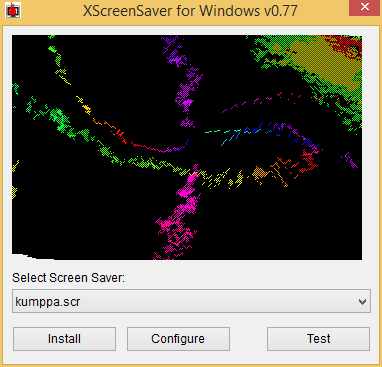
I found great screensaver port from Linux at http://katahiromz.web.fc2.com/xscreensaverwin/eindex.html contain more than 200 screensavers. Okay that's a LOT, in fact Windows will only list the first 100. Fortunately it come with random.scr which is a screensaver loader.

About half of them are opengl accelerated and with some of these I have error when exiting. I made minor workaround for that error which a least works for me. I also made minor modification in the directory organization so that all screensaver goes to one folder. This way the folder can be copied to Windows folder and random.scr loader can be placed in system32/syswow64 to minimalize "pollution".

Here is the download and modified source
version 0.77
XScreenSaverWin32.7z (2.74 Mb, 220 Screensavers)
XScreenSaverWinSrc.7z (2.71 Mb, VS 2008 Source)

I wonder if there is a MyPaint brush like that?


15 January 2016

8 Songs bundled with Windows

Windows that released during 2001-2010 have bundled songs. That is the home multimedia era, now with everything moved to cloud Windows 8 and later no longer bundling songs.

Here is the list of songs that I know:

XP:
Windows Welcome music by Microsoft
Like Humans Do (radio edit) by David Byrne
"Highway Blues" by New Stories
Symphony No. 9 (Scherzo) by Ludwig van Beethoven

2003:
No Hay Problema by Pink Martini

7 (Vista?):
Maid with the Flaxen Hair by Richard Stoltzman
Sleep Away by Bob Acri
Kalimba by Mr. Scruff

Apparently Microsoft aren't interested in mainstream genre such as Pop or RnB. I like that attitude!

Visual True Type for XP

Been years looking how to download this thing from Microsoft. Previously this was only available "by request" to Microsoft typography group or something, however it's near impossible to get a reply. Originally the program itself released circa 1999-2001 (yeah Win 9.x era and slightly updated when XP released). Now that it was made freely available https://www.microsoft.com/en-us/download/details.aspx?id=48728 (previously MS VOLT also made free and has been regularly updated). Together with other free tools in https://www.microsoft.com/typography/default.mspx are extensive font development tool for Windows. But there is one problem: VTT 6 is not for XP! geh

So I ask an anon question at stackexchange regarding backporting vista apps. I kind of expecting to get l33t answer like reconstructing IAT and some OllyDbg hacking session but it was shim method that come up. Well it was a technique commonly practiced anyway.

To summarize:
- VTT.exe need CompareStringEx and InitializeCriticalSectionEx which unavailable in XP kernel.
- Both functions available in msvcp140.dll (part of Visual C++ 2015 redistributable) with slightly different name along with other interesting backported functions
- VTT.exe is compiled with linker's osversion set to Vista (6.0)
- VTT.exe also protected with Microsoft digital signature

The shim will sit between vtt.exe and kernel32.dll+msvcp140.dll, so we could use renamed function redirection or loadlibrary way. I choose the first since there are not much of imported functions.

Basically I made shim that contain lowercase version of the function (you could use MSDN or MinGW headers to see the correct declaration) which call the actual function in kernel32.dll and msvcp140.dll for the missing one.

for example:
...
// CompareStringEx
WINBASEAPI int WINAPI __crtCompareStringEx (LPCWSTR lpLocaleName, DWORD dwCmpFlags, LPCWCH lpString1, int cchCount1, LPCWCH lpString2, int cchCount2, LPNLSVERSIONINFO lpVersionInformation, LPVOID lpReserved, LPARAM lParam);

WINBASEAPI int WINAPI comparestringex (LPCWSTR lpLocaleName, DWORD dwCmpFlags, LPCWCH lpString1, int cchCount1, LPCWCH lpString2, int cchCount2, LPNLSVERSIONINFO lpVersionInformation, LPVOID lpReserved, LPARAM lParam) {
__crtCompareStringEx (lpLocaleName, dwCmpFlags, lpString1, cchCount1, lpString2, cchCount2, lpVersionInformation, lpReserved, lParam);
}
...

and compile with:
gcc -shared -Wl,--kill-at -o vttforxp.dll vttforxp.c -L. -lmsvcp140 -s

Next we need to rename imported functions in VTT.exe to lowercase too (yeah kind of risky here) and rename kernel32.dll to vttforxp.dll, we can use hex editor.

Next we remove the digital signature, since it obviously become invalid now. we can use osslsigncode:
osslsigncode remove-signature -in vtt.exe -out vtt.exe

Next we need to downgrade os.version PE header to 5.1 (XP). we can use editbin or pehdr-lite
pehdr-lite vtt.exe -osver 5.1 -subsysver 5.1

As a bonus step, we can use Microsoft mt to add xptheme manifest

That's it! Well of course this case is rather simpleton but still is a real-world case :)
heck some apps even simply set the higher os.version (due to never compiler default) so that it could spew stupid error message like "invalid win32 application"...


09 December 2015

How to repack Visual Studio 2010 Express for SVCPACK installation

VS 2010 is the last for XP so I want to have convenient up-to-date package that I can slipstream into XP iso.
Firstly this post http://www.itninja.com/question/visual-studio-2010-express have all the ingredient for us to cook. Lets go!

- Extract all Ixp*.exe file with 7zip (ignore the warning).
- Make admin installer from each extracted vs_setup.msi (msiexec /a)
- Edit each of administrative version of vs_setup.msi with Orca:
  - Remove CA*LaunchCondition in all Install*Sequence tables (to allow running and updating)
  - Remove *SETUP entries from all Feature* tables (to remove copy of the whole cabinet installer)
  - Remove entries with CSETUPMM directory from Component table
  - Replace PIDKEY in Property table with your serial (without hyphens)
  - In Registry table find "UninstallString" (on first occurrence) and replace value of "SOFTWARE\Microsoft\Windows\CurrentVersion\Uninstall\[ProductName]" with "MsiExec.exe /X[ProductCode] "also remove its "UninstallPath" entry
- Save your edited vs_setup.msi
- Now you can remove all files in root except vs_setup.msi and remove CSETUPMM folder from "Program Files\Microsoft Visual Studio 10.0"
- Apply all applicable updates (SP1, etc) into vs_setup.msi (use the *msp file from VS10SP1*.exe )

Beware about your OS situation (.NET version, MSI, etc) cause after this you're on your own.

In my test compressing all (C++, C#, VB, Web Developer and its dependencies) with 7zip produce just about 150MB! Quite a saving eh

Edit:
- After merging patches we need to reset the package-code (Orca View > Summary) with the original one (and change the description as well if you wish)

24 June 2015

Windows version of djvudigital

Long time no write.. didn't meant I'm not around. This post is yet another prove that I'm a faithful Windows user :-). Admittedly I have using Windows 8.1 for months now, and damn what a buggy explorer!

You probably heard about djvu format about 5 years ago. But it kinda failed to gain momentum against the venerable PDF. Despite its rather simple (or rather "sufficient") feature, it meant to be less malice format than PDF.

Djvudigital has been around with no cmd batch port... its Ghostscript driver also a bit controversial (for linux zealot). But in this windows world anything is good as long as it apparently works. duh

This batch of djvudigital is converted into exe for convenience and will act just like batch file (aka it *need* cmd) see "BAT to EXE" page for info. It not complete port of bash version but parameters is the same as linux one, note:  it doesn't do sanity check of the Ghostscript executable whether it support djvu or not.

Requirements:
- Ghostscript with djvusep device
- Csepdjvu (part of djvulibre)
- and off course working CMD
- optionally gzip or 7za/7z

Installation:
Put all executables above in the same directory as djvudigital, you may put it in your PATH environment so you can called it anywhere. Type djvudigital --help for manual

Download:
djvudigital.exe 83 Kb

I've been using/abusing online-convert.com for a while for on-the-fly 'downversion' stuff from the internet, but no djvu there.

25 October 2014

Attack Surface Analyzer for XP

This utility released by Microsoft long time ago when XP still supported but ironically decidedly for Vista or newer only. I thought it kind of regshot (registry and filesystem snapshot) or similar but turn out a security risks snapshot. I patch it to work with XP (only) because when debug the half native half dotnet apps it actually or at least initially designed for a minimum XP SP2. The patch just change the required NT version from 6 to 5 and it works but hey I'm no security expert kay?

Dedicated to XP diehards:
http://d-h.st/Tk6 (32bit only)

Original source:
www.microsoft.com/en-us/download/details.aspx?id=24487

17 May 2014

Windows XP eXtended Patches

As expected MS are committed to support NT 5.1/5.2 OSes that are not at EOL period such POSReady 2009 (XP based) and most of Server 2003 lines. And our hero at RyanVM/MSFN has convert (ongoing) Post XP EOL updates so it can be installed into normal XP system.

Get it here

See Harkaz's ongoing Unofficial SP4 project here

Cool!