Showing posts with label review. Show all posts

05 January 2022

C++ standard, Runtime and XP

C++ standard has been evolving much more like Java, or rather no more like C evolution, C++20 module remind me of Java 11 it make C++ "appreance" no more like what it used to be... I wonder how far Windows XP could get the lastest C++ standard toolchain. Lets revisit C++ standard progression

C++98 (formally C++03) has been what XP supported by Microsoft (with its peculiarity and quirks) from the free VS2005 to 2010 express editon.

C++11: GCC 5 (2015) Clang 3.8 and Embarcadero BCC 10.1 (2016) MSVC 2015
C++14: GCC 5 (2015) Clang 3.4 (2014) MSVC 2017
C++17: GCC 11 (2021) still missing from_chars FP mode because Win32 has no uselocale()
             MSVC 2019 16.4 shared_mutex (not available in XP target, only C++14 shared_timed_mutex)
C++20: MSVC 2019 16.10 (2021) since 16.8 its runtime breaks XP for the first time (last: 14.27.29114)

While those compilers arrive at the same state around 2015, now we see Clang lagged behind, GCC is struggling and MSVC is geting faster and faster.

In Windows XP context though, GCC seems the only hope for any "sort of" C++20 support considering they have the principle of having as cross-platform as possible rather than as native as possible codebase. Clang libc++already break XP when implementing C++17FS.

How about C runtime?
Now called UCRT, apparently it also strangely break XP too. Being versioned as Windows SDK's the last XP compatible is 10.1.18362.1, starting with 10.1.19041 ucrtbase.dll through api-ms-win-core-memory-l1-1-0.dll redirector is asking dll.VirtualAlloc, dll.VirtualQuery and dll.VirtualProtect from kernel32.dll which previously not prefixed with "dll." weird... Note that Visual C++ runtime installer usually bundled with much older 10.0.10586 UCRT (from Windows 10 1511).

01 January 2022

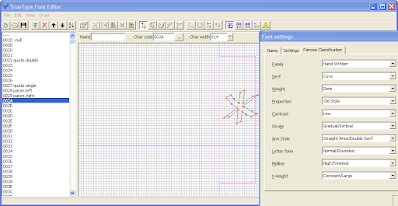
TTFEdit simple true type outline editor

This little gem is made by japanese programmer Yuno dated back to 2003. This is an opensource software, its borland c++ source sadly never archived : http://uri.sakura.ne.jp/~cosmic/yuno/download/ttfeditsrc.lzh. You could open and edit ttf font or create it from scratch, there is also reference image feature that help you trace existing bitmap text sample or hand-drawn font.

I have bing translate this app into english (using resource hacker). As the name implied only ttf format supported, no fancy modern web fonts format, no opentype just TTF.

TTFEdit show Panose spec property

This outline editor is nice companion to Microsoft Visual TrueType.
Note: You can't directly open font from %WINDIR%\Fonts from the open file dialog. Copy it somewhere else first.

download: https://sourceforge.net/projects/xpitory/files/static-builds/ttfedit.7z/download (400KB)

18 December 2020

Windows XP on the limit

 What is the maximum processor XP support?

XP support up to 2-way SMP (2 sockets), with a maximum 32 logical processor cores in total or with HT/SMT disabled up to 32 physical processor cores. XP can fully utilise SSE processor such as Intel Westmere or AMD K10 and will/may run under newer processor but wont be able to use AVX/FMA.


What is the maximum memory XP support?

Since 1995 32-bit i686 Pentium Pro 150Mhz has 36-bit PAE to access up to 64GB, in 1998 Intel provide PSE-36 driver (similar to Gavotte Ramdisk) for Windows NT 4.0 to access upper memory as pagefile. Windows 2000 has PAE built-in, original XP/2003 support 37-bit PAE (a maximum of 128GB physical memory in accordance to 32-bit Xeon processor spec at the time) and fully enabled in Server 2003 datacenter at the cost of "bad" bundled driver removal, but then "revised" to 64GB because 32-bit Server 2008 can't do 128GB, meanwhile XP SP2 restricted to 4GB with all bundled driver preserved. These limits are artificial switch based on marketing or to reflect testing result. However within 128GB only up to 16GB can be normally used, the rest addresses need AWE. Regardless each 32-bit process still limited to a maximum 4GB address space or from user perspective it is more like 2GB maximum. x86_64 CPU PAE has been varied depends on timeline and target market such 39, 40, 46, 48, and 52-bit. Fully 37-bit PAE need 980MB (for address translation) within system VAS (1024-2048MB), in this case if /3GB (4GT) or /USERVA=3072 is set then nothing is left for system, so Windows limit PAE to 16GB furthermore /3GB may negate addressable memory by AWE.

At processes level additional memory tricks available for user VAS such PE large address aware flag (in conjunction with /3GB) and AWE which is similar to PAE at user VAS level. The PE's IMAGE_FILE_LARGE_ADDRESS_AWARE flag may allow a user process to use up to 3GB, an AWE capable program can claim chunks (each less than USERVA value, up to <128GB in total) of PAE memory and get each needed chunk swapped in and out within its USERVA range (2048-3072MB). Example of AWE program is 32-bit MS SQL server, Oracle DB and MySQL 4.1-5.0 the latter capable of up to 64GB AWE memory. Another technique to overcome user VAS limit is to have multiple child processes such in Chrome browser and ABBY OCR or employ multithreaded batch processing such in ppx2, "make", etc.

Pagefile, a virtual memory that reside in storage device can be specified as 16 4GB pagefiles or 64GB in total, overall 192GB of maximum combined memory in XP. Imdisk can use AWE to create virtual disk that in turn can host all possible pagefiles and/or as mountpoint/target for %TEMP%. Just because a system has a lot of RAM (>4GB) that doesn't mean pagefile can be turned off, in fact there can only be one usable <=2GB system VAS at any time which instanced together with user VAS in every 32-bit process, thus system resource could be depleted if it cut by huge PAE mapping. Pagefile will allow system to expand some cache and pool out of the confined system VAS which at worst is about <1GB in >4GB system with /3GB. This is contrast with 64-bit Windows situation at the scale of TB VAs which more than current average size of installed system memory.

32-bit processor which has 32-bit instruction is not necessarily also has 32-bit addressing (i386-i586) it can be more such as i686 or maybe less like some i286 variant including all current x86_64 processors. Memory limit has been a moot point when talking about 32-bit OS like XP, but workaround those limitations is what make it fun.


What is the maximum disk storage XP support?

While NTFS 3.1 can go up to 256TB, other limiters make a 256TB disk impossible. XP only support MBR disk which maxed at 2TB for 512b sector or 16TB for 4k sector which need proper 4Kn controller. Dynamic disk (stripe/span mode) support up to 32 512b sector MBR disk of total 64TB agregated disk storage. Note that BIOS/NTLDR do not support booting 4Kn disk neither GPT disk (accessible through third party driver such Paragon GPT). NTFS however allow mountpoint other NTFS volume as directory to combine space though it wont change the root volume size. The fastest non-raid disk on XP is SSD either through ahci m.2 pcie 3.0 such as Samsung SM951 or through dual port SAS12G such as Seagate Nytro, both up to 2.2GB/s transfer rate.


What is the maximum XP desktop/display can be?

XP desktop is a virtual screen at 32000*32000 size with maximum exposeable area of 128 Megapixel which make it somewhat "bigger" but also smaller than GPU limit of 16k*16k. A monitor is an inset that panning over that area. The 32K limit may come from DIB format limit which is signed 2^16 integer, not sure what 128 Megapixel limit is all about as such area at 32-bit color would "only" need half GB memory however many 32-bit image viewer known to have problem displaying >100MP image, Windows Picture and Fax viewer for example could display (full size) up to 131MP. There is little freeware called sdesk that allow you to "stroll" over entire virtual screen without extra monitors.

XP can manage/arrange up to 10 monitors some say 10 is also the limit of display adapter numbers (dual-GPU card is counted as 2). Because of this dual-head display driver often capable of abstract larger monitor by pre-joining (span mode) the two before reporting to Windows thus counted as one. XP allowed different vendor driver to coexist thus enabling non-accelerated "non-sync'ed" mosaic setup of heterogenous GPUs and monitors. VGA, DVI-DL (7.92Gb/s), HDMI1.4 (8.16Gb/s) and DisplayPort1.1 (8.64Gb/s) are supported in XP, with all digital ones should be capable of 32-bit color UHD @30hz (4*3840*2160*30) or 4k @24Hz or 2560x1600 @60hz.


What latest hardware technology that XP support?

(This info compiled from driver files and not necessarily tested)

10Gbps Ethernet: Intel 82598, x520, x540; Qlogic 8140/2, 8150/2; Emulex OneConnect 1010x, 1110x; Mellanox ConnectX I (all pcie 2.0)

10Gbps SATAe: ASMedia 106se

10Gbps USB3: ASMedia 1142-3142

12G SAS3: Areca 1226, 1883 (support 4Kn)

OpenGL 4.x, OpenCL 1.x: Intel HD/Iris Gen3-Gen4 (no OpenCL driver); AMD Terascale 2 - GCN 2 (Bonaire); Nvidia Fermi - Maxwell

Wifi 802.11ac, Bluetooth 4.2: Broadcom 43xx; Realtek 88xx

19 January 2018

EulerOS 2.0 Test

EulerOS 2.0 is the (only?) freely available UNIX certified Linux distro, The other UNIX Linux: K-UX doesn't seems available separately (at least I can't find it).

version 2.0 with default Gnome 3
Made by giant tech manufacturer company Huawei, the OS name is not using "X" moniker like OSX, AIX or IRIX and we don't need to worry that the distro will be Chinese specific because the default language during installation is english.

Before that I found myself in confusion just trying to download it from http://developer.huawei.com/ict/en/site-euleros as pointed by earlier review, getting with registration shenanigans that ended with unresumable 4GB iso download. It turned own there is easier way just use the repo link here:

http://developer.huawei.com/ict/site-euleros/euleros/repo/yum/

There you'll find several versions, inside that you'll find os/x86_64/iso sub-directory leading to resumable iso download which literally contain the content of other directories. Note that version 2.0 has been recently refreshed (Dec 2017) with new kernel and packages on the level of CentOS 7.2 (which EulerOS based on). Therefor I found no additional packages in the site repo and you can just pointed repo.d config file to use directly your disc (unless you want updating).

Package naming follow CentOS but without "el7" moniker, that's make me suspicious if there any incompatibilities, for sure to comply with UNIX some modification needed for ex. the CLI userland
and compiler (GCC 4.8.5) may changed. So I try install several third-party packages such VirtualBox, old Acrobat Reader 9, Chrome and LibreOffice, everything works fine. Installing few "other" packages from CentOS repo also working. Note that with just 4GB repo EulerOS is severely lacking for desktop use, but mind you, this is a server-grade distro :).

I haven't investigate the userland changes (like if POSIX behavior become the default or not), actually I don't know where to get the sources for EulerOS.

Next I want to change the simpleton Gnome desktop with KDE which require borrowing lot packages from CentOS repo. If successful I may consider to really installing it along with Windows.

18 December 2017

Upgrading Pentium G2020 to Xeon E3 1265L

Today I received a used Xeon E3 1265L from China via ebay for $85. My motherboard is AsRock B75M-GL and originally host Pentium G2020 (was about the same price at that time). This Xeon is lower in wattage(45 vs 60) and has more cores (4+HT vs 2). Sandy/Ivy motherboard was Intel's last generation to properly support XP (my USB3 ports automatically turn to USB2), so I'm grateful to have this processor upgrade. Not just for XP but also for other classic 32bit compatible OSes (OSX 10.6.8, RHEL6, DragonFly BSD 3.2.8 or Solaris 10)

There is an incident during installation, I accidentally scratches the LGA pins and two pins get bent (gulp), When I first boot it, the BIOS tweets 4 times and I was like "Damn I'm done for it!". I spent a lot of time to massage the bent pins using smallest screwdriver that I have with other hand holding flashlight and I hardly break a sweat (cool). Once both looked upward again, the second boot get the system properly detected, temperature is at ~38C so I guess that's good enough for used item.

Now for the first time :


So this configuration: Server CPU  + desktop motherboard is a good deal afterall. I understand why used ECC DIMM is super cheap since it's has big compatibility issues, but this cheap Xeon is no-brainer.

BTW the delivery is one and half week late than the max. estimated date.

06 October 2016

How to use anything to generate thumbnail image of anything in explorer

Yep, that's probably idea of https://github.com/kenjiuno/ThumbGensPack/ made by japanese developer. Thumbnail generation happened in background by command-line application that feed 24bit bmp image, this non-blocking way is safer than using dll but at the cost of spawning repetition (and windows watchdog, antivirus scan and so on) delay of the generator since it's not a "server" process (for example like what RWThumbnails did).

The possibility is endless though you could generate thumbnail for text (e.g imagemagick), svg, image, audio, video, or virtually anything then piping or chaining the processes as long as it produce bmp. More importantly the shellextension works with XP :)

Give it a try!

09 September 2016

A rather quiet traffic for Windows 10 Rs1

Finally replacing Windows 8.1 with Windows 10! Within my first three days I need to make sure  that my internet connection didn't abused by Windows and under my control. Having experienced Windows 8.1 before, where explorer, rundll32 and svchost acted as ping bot or downloader this time there is more coming in Windows 10 despite during installation I've opted to turn off "sharing my stuff" with MS features.

Note the following tips are completely favor "bandwidth saving" over "security"

Let's start with services.msc
In XP, I just need to disable Windows Update and BITS, now we get telemetry (note every apps compiled with VS 2015? seems to inherit this ability, intended or not, managed or unmanaged)

- Background Intelligent Transfer Service (BITS)
"supposedly" and used to be the main downloader, but no longer

- Windows Update (wuauserv)
this need tuned on when installing offline update files

- Connected User Experiences and Telemetry (DiagTrack)
why I still need to disable this? well it still popped out sometime.

- Program Compatibility Assistant Service
this one is unrelated, but I need to mention here as this thing keep get in the way, choked up, and eventually dying and bring down system resources. Especially when I do three parallel sessions of mingw compilation script for 24 hours. Additionally in this case, using exclusion for Defender will help too.

Move to gpedit.msc
Contrary to usual mantra of dumbed-down Windows: "We (SYSTEM) will manage it for you", gpedit.msc give us tons of rules that SYSTEM will ahem.. *supposedly* obey. But I don't know why they sometime get telepathy with Redmond to do something else.

Disabled:
Allow definition updates from Microsoft Update
Allow real-time definition updates based on reports to Microsoft MAPS
Allow search and Cortana to use location
Allow Telemetry
Check for the latest virus and spyware definitions on startup
Enabling Windows Update Power Management to automatically wake up the system to install scheduled updates (err, this claimed not apply to W10, but just in case)
Initiate definition update on startup

Enabled:
Define the order of sources for downloading definition updates
Disable all apps from Windows Store *Enterprise/Education only
Do not allow web search
Don't search the web or display web results in Search
Turn off access to the Store
Turn off Application Telemetry
Turn off Automatic Download and Update of Map Data
Turn off game updates
Turn off Help and Support Center Microsoft Knowledge Base search
Turn off Search Companion content file updates
Turn off the offer to update to the latest version of Windows
Turn off Windows Update device driver search prompt

Windows Update advanced options:
defer feature updates (like LTSB ?)

Into Windows Firewall rules:
Programs Inbound/Outbound:

%SystemRoot%\explorer.exe

Others:
- Service  (Background Tasks Infrastructure Service, I think) that spawn BackgroundTransferHost.exe

  Within a logon session, it activated during the first-time the internet connected. I ca't find any reference reference from registry. Firewall is impotent to block it. I think this is modern app version of BITS. I need to kill BackgroundTransferHost manually.
- Spawned Rundll32 that spawn svchost (uh oh, or something like that),  there is ping activity but not bandwidth intensive. I need to kill rundll32 manually.

At the moment that's all I can do and it's considerable quiet for dial-up user like me.
I recommend ProcessHacker to monitor process and network activity.

Update:
There are several  BackgroundTransferHost.exe, in System32(or SysWOW64) and deep inside subdir of winsxs (or winsxs\wow64) so include them all in firewall might works, if not put it on Applocker?

06 February 2016

How to "use" isobuster for free

Since the day when CD burners don't have buffer underrun protection and that my HDD free space actually smaller than CD capacity this little software with cool batman icon always become a lifesaver. That time isobuster still free (pre 1.0 version), now within few years we might discard optical media for data completely (backup is OK though).

Isobuster interpret multisession disc, all kind of ISO 9660 extensions (Joliet, RR), UDF, extra track such HFS or FAT and El-torito boot image. It also show you the important thing: LBA! so you can tell by its physical location which files is vulnerable to disc defect. Finally isobuster do interruptible copying for recovery purpose. The old 0.99.9 still works on modern Windows as long as you run as administrator (or just add elevation manifest to it) but there is no support for UDF.

I know that Isobuster can be used in free (sometime nagging) mode but I'm not talk about that. The tool is FTK Imager Lite by accessdata. This forensic tool known to bundle isobuster 2.4 as shared library from version 2.6 onward, you can get older (and smaller) version via archive.org too. For current version: http://accessdata.com/support/adownloads

The basic important functionality is there, no LBA column list though instead placed in file property panel. No ISO image dumping except forensic image format. And no data carving (isobuster 3?). Overall what make isobuster so special already covered. Enjoy!

Two advanced free hex editors for Windows

Back in the day when all of my software were pirated software, WinHex is the single best thing I ever need. Now to replicate its functionality I have to combine two application HexEdit and TinyHexer or more.

TinyHexer

1. TinyHexer was my first free hex editor, it was the best during its time and probably still if only it support big file. The homepage www.mirkes.de has gone so you need to find mirror for mpth_18.exe or mpthme_18.exe. Here is mirror from softpedia http://download.softpedia.com/kRHV01DUV2Ym8XNnMprEEBK6t2a4wgfe/software/programming/.

TinyHexer's strength lies on good manipulation features and plugins which serious user will establish workflow with this tool. Furthermore tinyhexer is highly extendable, it has Delphi SDK (the file is gone?), scripting and macro replay. TinyHexer also has good reference help including scripting but not covering many of its plugins. One to note somehow tinyhexer doesn't allow paste in overwrite mode, make it hard when you have to combine/patching part of files, another minor inconvenient is the full page mouse scrolling.

HexEdit

2. HexEdit (okay what an ambiguous name here :P) the homepage is http://www.hexedit.com/. Personally I use this as tinyhexer replacement, but not for all features otherwise some are overlapped between the two. For example HexEdit missing opening process' memory but beside that HexEdit is completely different kind of hex editor. The overwhelming editing aids such track changes, mark/bookmark, highlighter, etc really make HexEdit like a word processor for binary files. Manipulation feature also extensive, lots of bitwise operation and conversion it even has data encryption (built-in) and arbitrary compression (via Zlib). HexEdit also have user expandable file structure template for analysis similar to tinyhexer.

One of its unique feature (WinHex can do this) that I like is "Keep Same Time" toggle which keep file date modification once you done editing. Its search function is comparable (no regexp unfortunately) but slower to tinyhexer. Startup also rather slow probably because its complex UI (based on MFC). The bundled manual is excellent, you'll need it for something like this. HexEdit also extendable via macro replay. In short HexEdit is the most advanced (if not overkill) open source hex editor I have ever used.


The niche extras. Two more hex editor deserve mention here for its built-in live disassembly and other for low-level operation.

FileInsight

3. FileInsight from McAfee http://www.mcafee.com/us/downloads/free-tools/index.aspx is hex editor specific for malware analysis so large file support is not a concern. Live disassembly is done using libdasm, by the way it will produce assembly for *any* interpretable binary data. The interface is rather flashy :D, I think this is a Delphi app. Its PE structure analysis is on par with the tinyhexer's plugin. And despite being niche, FileInsight also extendable, this time using JavaScript (via built-in spidermonkey engine) or Python (need preinstalled python). Note that open source wxHexEditor also can do live disassembly (via udis86) with other feature similar to the popular HxD.


disk editor
 
4. Active @ Disk Editor http://lsoft.net/disk_utilit.aspx is a low-level access hex editor that I have no other free comparison. The first two hex editor here able to open disk in raw however without the ability to traverse or sync with actual filesystem those two miss the usefulness. Most forensic tools also do low-level (raw mode) but usually for read-only acquisition and reinterpret the filesystem wholly including orphaned files (recovery) which Active @ Disk Editor doesn't (that what paid Active @ UNDELETE will do). Supported filesystem include: NTFS, FAT, HFS+, ExtFS, UFS and BtrFS. Like hexedit and tinyhexer, diskeditor also have templates in this case: boot record, partition table and so on. I found the interface rather confusing (Qt based) and could be more streamlined but this is no major issue. As bonus it could edit disk images too.


20 September 2014

Retro Pacman Game

First post since very a long time hiatus :)

Looking for a real remade for classic pacman but for Windows? there is plenty but I can say funman which is part of funpack.net for windows http://www.classicdosgames.com/game/Funpack.Net_for_Windows.html is the closest one however while it said to be freeware the installer is the original shareware :confused:.

funman with the "entertainment pack" esque

Alternatively, with a quite improved gameplay is njam https://sourceforge.net/projects/njam/files/ which continued as commercial version here http://www.guacosoft.com/njam/About.php. No windows build for the open source version, so I made one. I made a little change of the default setting so it will started in windowed mode (patch included in download)

njam

As a bonus I'd like to share newer win32 version of lbreakout http:/lgames.sourceforge.net/ which solve the mute of winamp (or possibly any other DirectSound playback) when the game started.


lbreakout2


links:
njam 1.25
lbreakout2 2.6.3

20 April 2014

PyGI AIO 3.12.x for Win32

With the new GObject-Introspection 1.40, gir generation now works with MinGW-W64 CRT and most docstrings issues seems been squashed too. GTK is not on Windows side though, version 3.12.1 looks buggier where an app (in this case gtk3-demo) will lose toplevel window (the one that is native and directed by OS), wish I have screenshot to show (I will). All 3.10  bugs also persist in 3.12, so despite of lots of new features it's really no good at the moment.

GTK 3.12.1 has lots of fixes in the Win32 theme (FYI, it's controlled by compiled-in css files namely gtk-win32*.css) which I tried to backport to 3.8.9 and 3.10.8 with some success, I also made correction on Windows XP specific part. But realized that perfect "theming emulation" is not possible yet with current css feature and event handling.

Overall there are new lots of libraries joined the AIO packages, with over 100 introspected libraries. The 64 bit port is not convincing... In some of my tests GI fail to resolve to existed exported functions of a dll, possibly getting skipped/mangled in the process. At C level, the libraries/apps behave just as good as 32 bit ones, so the problem is pygobject specific here.

Download for Python 32bit at:
http://sourceforge.net/projects/pygobjectwin32/files/

PyGObject homepage:
https://wiki.gnome.org/PyGObject

06 February 2014

What a handful Calculator !

I got lot of bitter experience with Windows 8.1 but still quite noob with it. Often I click the wrong shortcut for calculator from the start page where I launch App version instead of desktop version which on the next right list.

Just want to show that Software maker will race to make bloatware that parallel with current hardware level. MS said 8/8.1 has lower RAM requirement than 7 (well for some Windows 7 feature cut off that's already make sense). But probably they're after to compromise something else...

The inherently RAM sucker WindowsApp. After took several seconds to launch an eightened/flattened version of MS Calculator Plus (2005), I decide to look how much RAM it took.


A WindowsApp Calculator took 20MB (more than Virtual Box manager need)
A Vista/7 Calc need 3.5MB
And for the record XP Calc is about 750KB

That's roughly 5x increase for each generation to do the same task: crunching numbers. You could apply this comparison to other WindowsApp too. Also imagine if everything ported to WindowsApp...

Maybe when 32GB RAM  is common for consumer PC the next-gen calc will need 100MB to do "1+1" calculation... complete animated full 3d button with raytraced soft shadow and fully reflective OSD. Wait... at the moment it's backward evolution remember? we're heading to low tech mobile device where you can only view, read, write and play. Wake me up when Ipad can construct the next gen Game.

At the background of the screenshot, you can see the container of an App.. uhh ohh remind me of OSX's App bundle eh? Indeed while you could see numbers.exe there, it won't run by just double click on it (not in desktop mode at least). The container (the main folder) is a hierarchy of executable, settings and resources. This I think is how in the future apps will be standardized for Windows hmm I wonder. I need to have a look more at this stuff considering MS unlikely change their mind to retire desktop app in the future.

Windows 8.1 64bit was run as Guest under VirtualBox 4 under Windows XP 32bit

31 December 2013

A Retrospect for NT 5

This year I've been using Windows 7 for most of the time and only few month ago I decided to back on XP :-) and now it feels like at home again! In those period I found lot of bugs and the quirk of NT 6 so what's the point of getting new OS if you still have bugs to deal? No apparent productivity increase? Yes W7 doing good job at caching (just about everything that matter cached) but it's also a natural step as system with bigger RAM become common nevertheless XP can do some of that too though not as far.

When I go back with XP actually I just upgraded my system, now with 2.9 Ghz CPU and 8GB of RAM, thats right 8GB RAM equipped with 32bit Windows! I took a little experiment with Win 2003 32bit Enterprise (yep this version support BIG RAM), lot of tweaks required to make it behave like XP such as enabling hardware acceleration, sound, etc next I install RRamdisk because some apps refuse to run without pagefile. I allocate 512MB for OB intel GMA and 5GB for rramdisk (4GB pagefile and 1GB for %TEMP%) and it still spare 2.5GB of free RAM. Everything looks great and snappy. With this system I could run 16bit apps directly (OK via ntvdm) or run 64bit apps via VirtualBox. The key is multitasking, if your apps use RAM efficienly and the OS use less memory then you gain productivity! A 32bit apps usually well designed to work with e.g 2GB limit (so unlike 64bit app no need to worry about an app will eat your entire RAM!) though a further tweaks such /3GB ratio or editbin's LAA flagging will provide another scenario.

How about XP64bit? it still basically a dual system so more RAM needed.

I think about next year when XP no longer supported, well first I'm pretty sure the guys at MSFN will make unofficial Rollup Update like they do for Windows 2000. They made it able (to some extent) run some modern apps especially those not relying too much on Win32 API which updated in every major point release and things like .NET/Java. Before April doom come, I will give a test on that Windows 2000 inside Vbox (internet connected) to prove the 0day exploit buzz considering this Windows receive less patches than XP. If it's true then lets try freeze it with EWF/SteadyState, anyway I believe there many people still using it for good reason.

Happy new year XP! you are longest supported PC OS ever!

21 August 2013

Weeks of Maps and TPX

I've been spending 2 weeks dealing with maps for several related projects, exploring several (new to me) better projections such Cahill-Keyes-Waterman and Fuller. Probably GIS guys already knew this stuff but in case anyone (newly) interested in maps I have some tips.

OK first what about google maps, google earth or wikimapia? well if you ever find a reason for not using online resources then read on.

Since many Earth datasets has fall under public use, there are many efforts to bring "open source" friendly yet highly detailed maps for mere mortals. Unless you're GIS guys you may not need SRTM, Landsat, VMAP, WVS, CDC's shapefiles and others as there are several ready to use (or easy to setup) maps for people with zero GIS experience.

Vector maps:
- Wikipedia users have made accessible vector maps here (the most detailed svg): http://commons.wikimedia.org/wiki/File:World98%2B.svg
- Duncan Webb's Cahill-Keyes World Map (draft) : http://www.genekeyes.com/DW/DW-1.html
- Gene Keyes's map sources also made available in OOo draw format (need GIS knowledge) : http://www.genekeyes.com/MEGAMAP-BETA-2/
- CIA's factbook (less detailed but up to date) : https://www.cia.gov/library/publications/download/‎

Raster maps (not ready to use but easy to setup) :
- http://www.paulillsley.com/gia/index.html

Among above vector maps, wikipedia map probably the one that readily editable. For inkscape users, 15MB file is quite common/average but 15MB of just polyline is really heavy one! I have been using Tpx for some months now and it fulfill my need of semi-technical drawing. When I try to open World98+ map above, I thought it will suffocated but Tpx handle this file with just 60MB of RAM. Trying to do this with inkscape will freeze your computer winamp's playback -_-! But then how to edit this file efficiently?

Well in Tpx the drawing area is "barely" movable and zoomable, redraw takes several seconds (at any zoom) but no redraw for undo though. So maybe with more powerful CPU it may do. But there is easier way. Since Tpx spend little memory, you don't need to worry of running out of memory (how convenient).

Tpx don't have layering system like inkscape nor understand xref like CAD. So we do chunked file management.

- break the groups

 - copy-paste each region into new session of Tpx


remember that copy-pasted chunk will preserve coordinate/location, so to merge back simply use copy paste operation again.

- the ideal editing workspace is at country/states level:


Lesson learned:

Good application is the one that have good combination of stability and features not bloatness, and part of the stability is smart memory management. Tpx may lack much of SVG features such as gradient ramp/mesh but talk about mission critical apps: "before you can edit you need to open it!". Sorry if I sounds like making a dig to inkscape, but damn they sure know how to make bloat. I want my old sodipodi back!

 Additional note: In case you wonder how the world98+.svg created from http://commons.wikimedia.org/wiki/File:World98.svg. The metadata says:

"Generator: Adobe Illustrator 14.0.0, SVG Export Plug-In . SVG Version: 6.00 Build 43363)"

yeah a real world app huh!?

16 June 2013

Pinpoint, another approach for presentation

Previously I've tried fluxus for live presentation using a basically game engine + scheme scripting. Due to unresolved issue and the need to learn new language, I'm giving up and looking for much simpler alternative despite I still consider fluxus as a novel apps with no equal alternative.

Pinpoint is small, light and opengl accelerated presentation tool with a kind of magicpoint approach (you write down tagged text representation). It's similar to OSG's Present3D which is between pinpoint and fluxus in term of features, but Present3D require you to write a not-that-readable XML file instead which is nasty without the help of WYSIWYG editor. Pinpoint is simple, it has no advanced timeline/layer like in office software and geared for quick and dirty presentation. Pinpoint also feature extendable transition FX system (powered by clutter) by writing your own FX via loadable json file.

Here you go:

Static build win32, patched to make it more standalone :-)
download: pinpoint and sample+patch

notes:
- to test just drag and drop introduction.pp to pinpoint.exe
- no video support (I'm still figuring out how to build gst-ffmpeg statically) seems played but not rendered by cluttersink
- image support: png, jpg, gif
- basic FX are bundled in the executable, if you make new fx put the json file alongside the executable
- export: pdf only
- pinpoint.exe has console window, pinpointw.exe doesn't
- if you want to compile it yourself, please use gnome libraries released circa 2011 and avoid cairo 1.12.x

see their homepage to learn how to write a presentation file https://live.gnome.org/Pinpoint
Enjoy!


06 March 2013

List of UPX Illiterate AntiVirus

I want to make a black campaign and my target is some consistently ignorant AntiVirus makers.
Thanks to virustotal.com for make this painless

Simple case:
1. gplc.exe (gnu prolog) https://www.virustotal.com/en/file/9e2acb4176669e48f7a0aadd3fcbb39ade979b8843be87db9da5a42fe10ec290/analysis/1362534179/
2. pack gplc.exe with UPX https://www.virustotal.com/en/file/381976956f94d747407e9beaa9231dacdbd6bc19093621cc8058a3bbd09f3b06/analysis/1362534370/
3. unpack packed gplc.exe with UPX https://www.virustotal.com/en/file/86323543730fc67432854d6ff4eceaa6b0a8096befbce37fa6062d9e4450d4ff/analysis/1362534576/

The suspect file http://osspack32.googlecode.com/files/GPLC.7z

And the award goes to:

1. TheHacker
2. TrendMicro
3. TrendMicro-HouseCall

Now that's just a simple case, but if an executable involving networking functionality the analysis of our AV "champion" will goes into cosmic territory and hallucination... such pathetic and irresponsible (they will rely on user report) behavior should never exist in a software of AntiVirus caliber. More.. some big company make actually malware-behaving software and force AV maker to whitelist them as reported by nirsoft. But when false-positive involve open source technology it become ignorance

UPX itself is an open source software to compress executable.

So stay tuned with this page for most updated list of antivirus whose programmer can't read any single line of UPX source codez. ha ha

So what? Why just "don't use UPX" and that "UPX is useless, bla bla... anyway" ?
Well because we're human dude, and we fix our mistake !

05 September 2012

Ultimate++ Library Edition

This weekend I'm evaluating several GUI Libraries which have very liberal license such as new BSD or MIT. and found only IUP which is C based. There are some GUI libraries come as part of framework, they use different configuration and often have their own build tool: VCF and U++. Both C++ based and was meant to be work together with the sources instead of available in usual binary distribution such as GTK, considering their license which developer given total freedom to modify the library itself. I tried to package it into distribution friendly way. Let's try U++!

Overall from its examples U++ was intended to compete with Qt or Wx though with current situation Qt is the most advanced. U++ use BLITZ for a fast compilation (SCU), sort of what GHC did which a bit confusing to packaged as they're combined objects. Binary size is reasonably small at minimal setup but as usual mingw build is always significantly larger than VS especially with C++.

U++ has a quirk to make it available as package, while we can choose not using BLITZ and rebuild all *.a (except theIDE related) to monolithic archive there is an exception: files *.icpp which determined and called by "uses" in .upp file that compiled and appended during linking process. This create problem for generic packaging as they are conditional requirement. The (ignorant) easy workaround is to link the whole *.icpp objects (can be done in pkg-config's libs option too). This however create up to 700KB larger binary as some objects aren't actually needed but will works with generic compilation way.

Here is binary as library for both 32bit and 64bit
http://osspack32.googlecode.com/files/upp4193_32_64.7z
http://osspack32.googlecode.com/files/upp4193_mingw32.7z (only for MinGW32 dwarf2)

note: it's MinGW-W64 SJLJ based and if using with vanilla G++ you'll need to append -lpthread during linking and naturally TheIDE still needed for GUI craft. When using postgres/ssl plugin then openssl and postgres client library required. 

Currently I had side project related to postgres and need BSD licensed GUI with built-in support, but after some trials I found myself lost... this weird(unique) C++ approach is too high for me to boot :-(

02 April 2012

Continued... PHP and nginx

Tonight I try to resume what I left yesterday: setting up php with nginx. I try to follow http://wiki.nginx.org/PHPFastCGIOnWindows, but since I have single exe php-cgi I would just copy it and php.ini into nginx folder. Thus use non-hardcoded path configuration:

Before that I have to comment about the RunHiddenConsole thing, in PE thingy this is just a matter of using -mwindows or -mconsole during compile. And there is a better tool called postw32 (from freepascal project, I included this in my mingw build) which could turn any console application into consoleless a.k.a "click and nothing seems to happened" (because it was already windowless) or vice versa (back to console again).

so inside conf\nginx.conf instead of:

root c:/www;

location ~ \.php$ {
fastcgi_pass 127.0.0.1:9123;
fastcgi_index index.php;
fastcgi_param SCRIPT_FILENAME $document_root$fastcgi_script_name;
include fastcgi_params;
}


I just need (merely replace /scripts with  $document_root  from stocked config):

location ~ \.php$ {
root html;
fastcgi_pass 127.0.0.1:9000;
fastcgi_index index.php;
fastcgi_param SCRIPT_FILENAME $document_root$fastcgi_script_name;
include fastcgi_params;
}


Both configuration assumed we have virgin php.ini (doc_root has empty value, do not confuse with nginx's   $document_root  above which translate root declaration before it that is "html" which refer to html folder relative to where nginx.exe located). In short we have portable configuration.

Now talk about respawning thingy... in the bottom part of the wiki before describe how to make it run under SYSTEM account. Well let me tell you something:
AFAIK we (as admin) could impersonate to SYSTEM using "at" (scheduler) command then kill "explorer.exe" just before launched and bang Windows P4WN3D and CHR00T3D! no no not that old trick, actually the proper way is to use "sc" command see below:

C:\Users\Administrator>sc create --help
Creates a service entry in the registry and Service Database.
SYNTAX:
sc create [service name] [binPath= ] ...
CREATE OPTIONS:
NOTE: The option name includes the equal sign.
type= (default = own)
start= (default = demand)
error= (default = normal)
binPath=
group= 
tag=  
depend=
obj= (default = LocalSystem)
DisplayName=
password=


Extra Extremely Important Note: That is an empty space right after equal sign and before the actual value.

Now we could even make php as service too that depends on nginx service, or run them under different credential (a hidden user preferably, you know like postgresql way). Nginx already have respawning (parent - child) facility adding it to relaunching service will increase its reliability more too.

Hmm.. I will make my own stack installer one day maybe came up with tagline: "Install and run in 5 seconds yet takes only 10MB of space" Yeah whatever, but I really hope this will become a fine release and get it's own page in the main menu of my blog. Certainly need more testing


22 February 2012

Testing WebkitGTK3 1.6.3 Win32

This is a test using the supplied GTKLauncher with default settings, I have done most of these tests a year ago and found few workaround but mostly remain the same now.

Core components:
WebkitGTK 1.6.3
GTK+ 3.3.6 using adwaita theme
libsoup 2.37.3

Issue 1. 50% resources hog


When opening certain pages (in this case google.co.jp) browser will eat up 50% resources (my system is dual core).
Workaround: unfocus the window (you kidding me? that's not workaround)


Issue 2. Unicode glib, fontconfig and pango aliases.


Under Linux, baidu.com reportedly okay (glib backend) while becoming like this under windows, anyone knows why?


Workaround: build webkitgtk against ICU instead of glib, above is webkitgtk 1.2.7 with ICU (gtk2)


Wikipedia.org shown with freetype backend and default etc\fonts\fonts.conf


With freetype backend and modified etc\fonts\fonts.conf (add autohint, antialias and set tahoma as default). Here most indic languages is back, under windows 7 and pango 1.29 this should rendered near perfect like below but fonts.conf need to be set to segoe ui. Also notice dropdown list widget above is now properly rendered in GTK-3


With modified fonts.conf and modified pango.aliases (due to limitation in Win XP) also need additional unicode fonts.


Issue 3. Local file URI


Regression: webkitgtk 1.6.3 can't open windows' file URI see wikipedia, other schemes also failed


Here is how version 1.6.3 treat the triple slashed URI, it's like opening "/D:/Sources/webkit-1.6.3/html/index.html"


Application like Devhelp also affected


Webkitgtk 1.2.7 (GTK-2) correctly open local files


Issue 4. GCC miscompiles JavaScriptCore
When compiled against win32 api from mingw-w64, for example webkitgtk produce the following anomalies:

Numbered list stopped after 9th...?
Google top menu not shown in black

Workaround: use mingw32 or find the culprit?


Issue 5. Video


With gstdirectsoundsink and gstautodetect from gst-plugins-good webkitgtk3 also could play html5 video canvas and compared to 1.2.7 there is time lapse info. But other issue still the same: once volume muted sound will gone forever. Notice that fullscreen mode doesn't work in Windows so don't clicked it.

Issue 6. Printing doesn't work properly

Webkitgtk seemed to print with correct outer frame width (fitted?) and anything else is scaled down by approximately 8 times (thanks to Pawel for the report). Not an issue under linux.

Workaround: scaling up before printing

Issue 7. No plugins
And that's what youtube said

Okay that's enough with the problems :-)

Good :-)

Notes: If anyone encountered Mutex (pthreads) issue during building try to use https://mingw-w64.svn.sourceforge.net/svnroot/mingw-w64/experimental/winpthreads/

09 February 2012

The closest thing to Thinstall

Portable app will getting more interesting with this available open source tool: a registry emulation
The fabled ThinApp (formerly Thinstall) is an application level virtualizer for windows that handle both filesystem and registry redirection. Each have true virtualization, one of the simplest thing of filesystem redirection is by altering some common environment variable like %USERPROFILE% %PROGRAMFILES% and so on at user session level. But this method is nowhere near what Thinstall do. Say, what if the program call for hardcoded path?

Few years ago I've looking for OSS alternative for Thinstall, if I recall there was one, a research product (I think) which come as source code only, too bad I forgot its name.. but seems to be discontinued or become commercial software (dunno).

Now let's leave that one alone because OSS generally more simple and timid when it come to Windows (no COM, no ActiveX although now there are some). Now about registry... Like it or not no matter how clean and standalone an application is, it will indirectly ask for many information from registry via windows so it's good to emulate it.

And this app "WinAPIOverride32" http://jacquelin.potier.free.fr/winapioverride32/ don't let the name fool you (me too) for thinking "oh an open source alternative of procmon" but wait till I unpack the zip file, a registry emulator being bundled! (Umm.. well registry emulation is basically overriding one of Windows API) While still in beta (source code available) the documentation is minimum but clear enough and there is video too http://jacquelin.potier.free.fr/winapioverride32/videos/registryemulation.htm

For large OSS app like OpenOffice, this tool could be a lifesaver (no compromised functionality). I'm still playing with it tonight :) will see how far it can go, for my first try I want to emulate userlevel fonts availability by emulate HKLM\Microsoft\Windows NT\CurrentVersion\Fonts a.k.a adding fonts without admin rights and put it in user accessible location.

Check it out dudes! oh caveat that I don't feel:  it's currently a 32bit only