28 August 2022

Age of Mythology Extended Edition in Windows XP

Five years ago I made xompie (which is nothing original) and one of its part is wined3d, but sadly because of my Intel HD has crappy OpenGL driver, wined3d never really works for me.

Now replacing my old ivybridge mobo with another ivybridge (optiplex 7010) mobo with 16GB and nvidia GT 730, I could run AOM EE with wined3d.

aom ee run in xp

basically just need d3d11.dll, wined3d.dll, dxgi.dll and gdixp.dll dropped in the game directory, but the developer add OS version check in aomx.exe which I think could be solved with MS Application Verifier that lies about windows version, or else using IDA I found the game filter out OS that older than NT 6.0 (Vista need SP2 for DirectX 11), patch can be peformed using hex editor at offset 1618813 by changing 06 into 05 (the version major) now it will filtered out anything older than Windows 2000. Also aomx.exe has PE subsystem version of  6.0 so we need to fix that to 5.0 as well.

Additionally it appears that cursor initial coord by wined3d is wrong, therefor mouse has offset. This only happen in fullscreen mode. To fix it we could create override config file in .\startup\user.cfg and put these lines:

xres 1280
yres 720
+window

That's it. well I'm not really a gamer but if there is a game that I play a lot in the past that would be Age of Mythology.


20 July 2022

Final EOL of Java 7 download for Windows 32-bit

 As pointed out in Oracle blog: https://blogs.oracle.com/java/post/java-se-7-end-of-extended-support-in-july-2022

The final update for Java 7 has been released, one of openjdk vendor (probably the only one) Zulu provided installer (and zip) for 32-bit Windows:

https://cdn.azul.com/zulu/bin/
look for zulu7.56.0.11-ca-jre7.0.352 or zulu7.56.0.11-ca-jdk7.0.352, both 32-bit and 64-bit provided, and are compatible with XP too, make it theoretically most "secure" java for this platform assuming your jar can run with it.

12 March 2022

Big World Map template for free

I made big Cahill-Keyes projection template map here:
https://archive.org/details/bmng_1px2500m_worldmap (10MB, 16000x6277 RGBA webp)
rev1 https://archive.org/details/bmng-ck-16k-1px2700m (15MB, 16000x7524 RGBA webp / RGB jpg)
rev2 https://archive.org/details/megamap (58MB Megamap, 68MB Wegamap Jpeg only, PNG is too big)

It may not be suitable for printing at all considering how dark it is, though the original BMNG was even darker but hey thats how our earth looks like. It is intended to be the biggest relatively proportional (globe-like) map viewable by 32-bit image viewer on computer :) and you can start ask yourself where is ukraine?

Anyone could use it as background and start laid textual information over it, and then export it to pdf. The free MS expression design can do that nicely, but the image need to be converted to png first.

Big thanks to https://github.com/jkunimune15/Map-Projections for providing CK map generator! back then it was tedious process to generate one using perl script.

EDIT:

First revision released:
- typo of scale, 21600/16000 * 2000 = 2700 duh
- add antarctica bedrock map at 0m (sea level) in grey shade
- make population shade more visible
- fix bathy error due to blending mode
- add land attachment for Antarctica Greenland, Russia, Iceland, Solomon and Kerguelen per keyes' megamap spec but not for closely separated land

Second revision released:
- target 1px=1000000 hence "mega"-map now, sadly it getting harder to open the file on 32-bit Windows.
- redo relief bump and shadow with more exaggerated downsampled 15-arcsecond SRTM dataset
- use SEDAC 2020 30 arc-second dataset for population density
- added river "hint" in glowing green
- redo more accurate sealevel bedrock map of antarctica (it may not bigger than australia)

Tools used:
gdal, paintdotnet (and many of plugins), expression design and vips.

05 January 2022

C++ standard, Runtime and XP

C++ standard has been evolving much more like Java, or rather no more like C evolution, C++20 module remind me of Java 11 it make C++ "appreance" no more like what it used to be... I wonder how far Windows XP could get the lastest C++ standard toolchain. Lets revisit C++ standard progression

C++98 (formally C++03) has been what XP supported by Microsoft (with its peculiarity and quirks) from the free VS2005 to 2010 express editon.

C++11: GCC 5 (2015) Clang 3.8 and Embarcadero BCC 10.1 (2016) MSVC 2015
C++14: GCC 5 (2015) Clang 3.4 (2014) MSVC 2017
C++17: GCC 11 (2021) still missing from_chars FP mode because Win32 has no uselocale()
             MSVC 2019 16.4 shared_mutex (not available in XP target, only C++14 shared_timed_mutex)
C++20: MSVC 2019 16.10 (2021) since 16.8 its runtime breaks XP for the first time (last: 14.27.29114)

While those compilers arrive at the same state around 2015, now we see Clang lagged behind, GCC is struggling and MSVC is geting faster and faster.

In Windows XP context though, GCC seems the only hope for any "sort of" C++20 support considering they have the principle of having as cross-platform as possible rather than as native as possible codebase. Clang libc++already break XP when implementing C++17FS.

How about C runtime?
Now called UCRT, apparently it also strangely break XP too. Being versioned as Windows SDK's the last XP compatible is 10.1.18362.1, starting with 10.1.19041 ucrtbase.dll through api-ms-win-core-memory-l1-1-0.dll redirector is asking dll.VirtualAlloc, dll.VirtualQuery and dll.VirtualProtect from kernel32.dll which previously not prefixed with "dll." weird... Note that Visual C++ runtime installer usually bundled with much older 10.0.10586 UCRT (from Windows 10 1511).

04 January 2022

Strange Adventures in Infinite Space SDL edition

 SAIS is unusual space strategy  game for its time, it opensourced in 2005 and then modernized at github as well as no longer run on XP. It was one of many tiny XP-era games that I collected. I take the SDL1 version source and compiled it, put the full game data and noise-filter the sound files to make it less annoying... is that what the author thinks of void space noise :(. Since this one is SDL based it is now run windowed! yay.


download: sais-1.5.0_sdl1.7z (2.8 MB)


01 January 2022

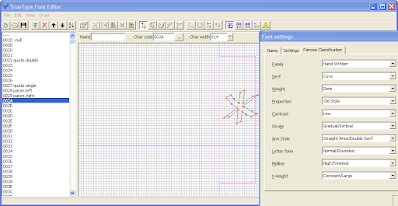
TTFEdit simple true type outline editor

This little gem is made by japanese programmer Yuno dated back to 2003. This is an opensource software, its borland c++ source sadly never archived : http://uri.sakura.ne.jp/~cosmic/yuno/download/ttfeditsrc.lzh. You could open and edit ttf font or create it from scratch, there is also reference image feature that help you trace existing bitmap text sample or hand-drawn font.

I have bing translate this app into english (using resource hacker). As the name implied only ttf format supported, no fancy modern web fonts format, no opentype just TTF.

TTFEdit show Panose spec property

This outline editor is nice companion to Microsoft Visual TrueType.
Note: You can't directly open font from %WINDIR%\Fonts from the open file dialog. Copy it somewhere else first.

download: https://sourceforge.net/projects/xpitory/files/static-builds/ttfedit.7z/download (400KB)

31 December 2021

WebAssembly in Windows XP

While it has been 15 years since I did real Webdev work (php + dhtml mind you), my recently build clang toolchain need some wasm trial. This tutorial https://depth-first.com/articles/2019/10/16/compiling-c-to-webassembly-and-running-it-without-emscripten/ will serve as reference, emscripten itself being mostly python based might be works on XP.

clang download: https://sourceforge.net/projects/xpitory/files/clang/ (25MB)

to check what's supported target:


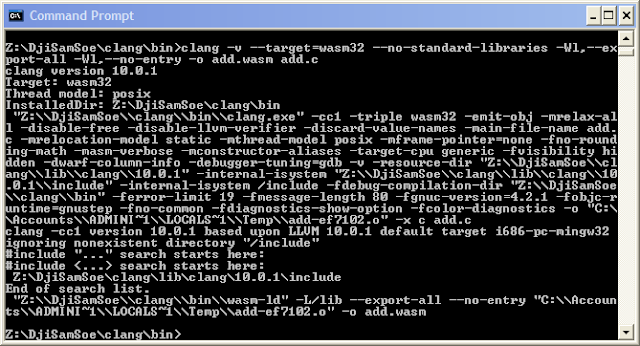
Compiling add.c example (I added -v to see more detail):


As the article explained browser security mostly prevent direct access like that, so lets skip to python webserver:


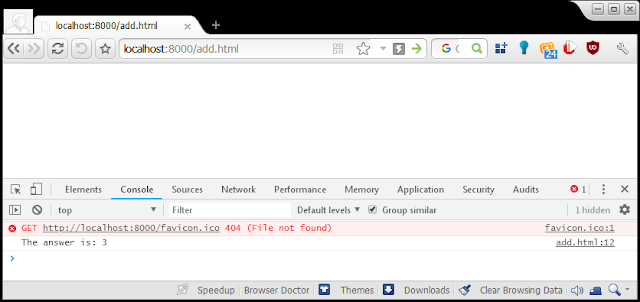
To test add.html, 360 Chrome Browser 69 is used:


That's it. I think...


WASI runtime is included in the clang package above, but haven't follow up the article to test it. Basically think of wasi sdk like mingw + libgcc + libstdc++, so instead of relying on emscripten prepared libraries you build your own from scratch. Note that since llvm 12 there is llvm own libc, not sure how different is this from wasi-libc.

next time I will demostrate using clang 10 as usable Visual C++ 2019 build tools replacement, all within XP box.

25 December 2021

Lightweight PDFium based reader

For a long time the best lightweight PDF reader for XP is SumatraPDF 3.1.2 which based on MuPDF. There is  alternative such poppler/xpdf and ghostscript, all of them use rather unfriendly GPL-like license. PDFium which used within Chromium is new BSD license or APL 2.0 but has crude packaging (typical of google).

I stumbled on https://github.com/vfr/UXReader-Windows a nice pure Win32 API UI library for pdfium, then made little quick change on UXReaderMainWindow.cpp: commenting ChangeWindowMessageFilterEx (which break XP) and add simple argument passing using CommandLineToArgvW so it now will open file from association / cmdline. Note that it's just a barebone demo for the library but IMHO suck less than FoxIt reader. I mean whats the point having a light renderer if you bloat everything else.

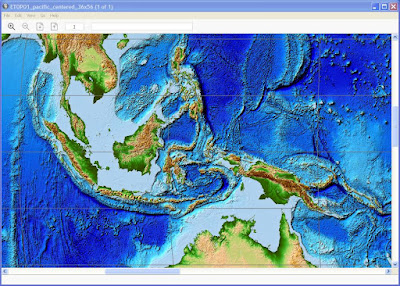
Campared to MuPDF I think it's faster (and smaller too), still when rendering image-rich page with multiple overlays and transparency nothing beats Adobe Reader!

opening large ETOPO map

download: UXReader.7z (1.6 MB) require VC++ runtime 2017

24 December 2021

Python 2.7 and TLSv1.3

Python 2.7.18 is the last bugfix version of any python that officially support Windows XP. By default those trying to build it on Windows will need openssl 1.0.2 per preconfigured VS2010 project file, that mean TLS 1.2 at best for you. However as we know, the patch to support TLS 1.3 also landing on 2.7.x line all you need is to build hashlib and ssl module with openssl 1.1.1 or preferably 3.0.x header and import libs (so you can update the dll in the future). 

To do so, basically remove libeay and ssleay projects from the solution and remove them from being listed as dependency of _ssl and _hashlib project. 

Put openssl 3.0.x header directory "openssl" into [root]\externals\openssl-1.0.2t\include32 

Rename the import lib of openssl 3.0.x into libeay.lib and ssleay.lib respectively and place them at [root]\PCBuild.

Build haslib and ssl module as usual.

To see if your python has TLS 1.3 you can use ssl.HAS_TLSv1_3 boolean to make sure they are compiled properly, note that with openssl 3.0.x there are a lot of deprecated warnings but no error. Be sure to put libcrypto-3.dll and libssl-3.dll in either DLLs subdirectory and anywhere in %PATH% environment.

my build can be found here https://sourceforge.net/projects/xpitory/files/python/

Since openssl is dynamically loaded it's preferred to be compiled with MSVC 9 (as is python 2.7) though I rarely see issue of mixing msvcrt.

my personal build of openssl 3.0.1 https://sourceforge.net/projects/xpitory/files/shared-builds/openssl-3.0.1-fips-win32.7z/download

19 December 2021

32-bit OSes for Virtual PC

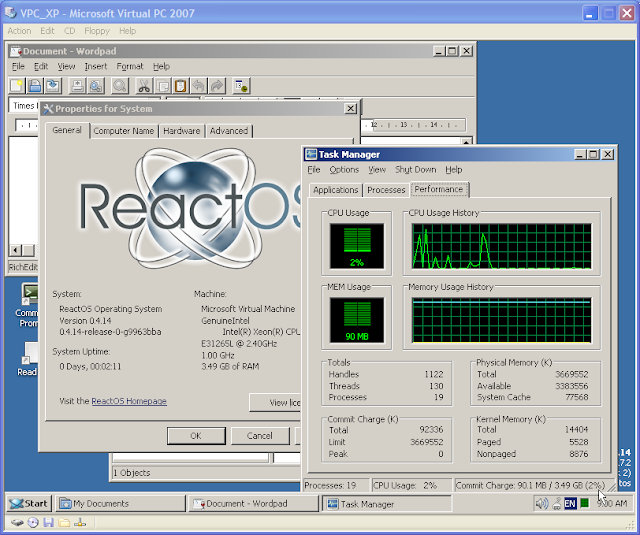
After being not bootable for long time, finally ReactOS 0.4.14 is run on Virtual PC 2007 again! This opensource NT5 remake project are closely related to wine and mingw which quite helpful to enhance XP. 

ReactOS 0.4.14


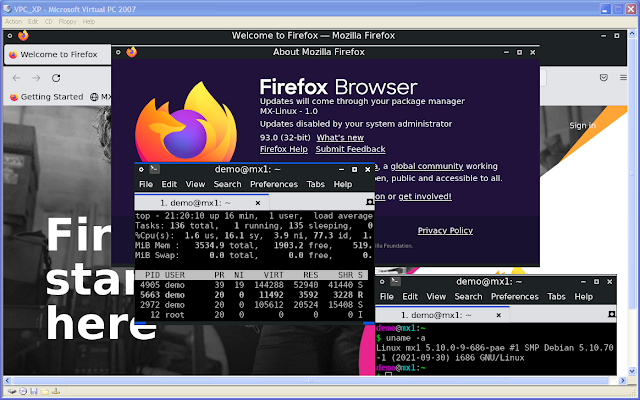
On other hand I'm checking out what's the greatest 32-bit mainstream Linux distro available for Virtual PC, MX Linux 21 (Linux 5.10 LTS) is one of few. This "lightweight" fluxbox variant shown running Firefox 93. Booting took some minutes though.

MX Linux 21

I've kept some historical 32-bit Linux distros iso that compatible with VPC as well:

RHEL 6.10, Oracle Linux 6.10, CentOS 6.10 (Gnome 2, LK 2.6): the last true "LTS" (~10 years) 32-bit Linux, which demonstrate how far kernel 2.6 can be tweaked and enhanced through backport.
Chakra 2012.07 (KDE4, LK 3.4): a rare 32-bit KDE4 SC distro, if not the only one.
Tails 3.11 (Gnome 3, LK 4.8): Privacy oriented distro, a rare Gnome 3 with systemd that able to boot into desktop after a little while.
Xubuntu 18.04.5 (XFCE4, LK5.4): generally regarded as the last 32-bit Ubuntu.

18 December 2021

Resuming XPitory

In the past, I made promise about blogging more but deliver none. This time, I'm deliver some before blog it...

20 years after XP released, it still my main windows OS and without a doubt the greatest 32-bit OS of all time.

Now with everyone start ignoring its existence, it's a good time to officially call XP the center of 32-bit retrocomputing.
A time when 2GB ought to be enough memory for anything, a time when entire OS fits in a CD and a time when people care much about making lean and mean software.

Xpitory used to be a place where I put few port for XP years ago. Now I have new goal, this would host lots of opensource software for XP. It will start by providing development toolchain first.

The plan goes like this:

1) Toolchain (compiler, VCS, make-tools)
-- Clang/LLVM 10 + GCC 10 (done, GCC still uder testing)
-- Git 2.34.1/SVN 1.14.1 (done)
-- cmake 3.20, ninja 1.9, msbuild ??, meson ?? (cmake and ninja: done, newer meson need python 3.5: done, newer msbuild need mono 6.12: not started)

2) Command-line software. Nowadays the most powerful software to tackle modern task usually available from CMD box, they are more portable and easier to port to XP.
-- FFMPEG
-- VIPS + IM
-- more

3) GUI Software. This is the harder one, framework like Qt, GTK and WX are increasingly getting away from XP, especially when they put effort on HiDPI, touch awareness and fixes for Windows 10. Other such as the lame Electron should be ignored.
There has been significant growth on Qt5-based software, so putting a working Qt 5.15 on XP is priority. QtWebEngine dependency will be avoided while QtWebkit still possible. Few software still use Qt4, putting on version 4.8.7 with all unofficial fixes and add webp support to it would be nice.
GTK 3.x will be avoided. it's slow and it is the one that technically getting farthermost away from Windows. Focus will be on porting GTK2 software instead.
WxWidgets supposedly the most windows friendly, but I'm not familiar.. will see about it.
MFC: should be no problem, as long as < VS2019 16.8
FPC/Delphi: FPC still support XP, Delphi software known to use lots of delay-load dll to check compatibility.

30 March 2021

The state of Java 8 support for Windows XP

Java 8 has complex situation on the unsupported XP. Back in early versions, the installer will warn user that it require newer windows and may not functioning as specified if user proceed. Indeed things start to break one by one, as a software platform runtime it might not obvious when it works or not that's until we ask specific broken component otherwise JVM continue on happily.

These are several component that I notice breaks on XP.

U111: the last version where JavaFX component works

U241 and U242: the last version where crypto API works (sunmscapi), newer version require NCrypt (part of MS CNG alongside BCrypt)

U261/U262: add TLS 1.3 support (jsse) and since it is related to sunmscapi it's pointless for XP, also in this version java executables no longer runnable on XP as their PE header set against NT6. It can be fixed to run on XP but doing so will break digital signature.

In my experiment we could mix newer java binary with older working component e.g. JavaFX or Crypto API, as long as they replaced as whole (dlls and jars).

Another complication, U151/U152 is the last installable version and U201/U202 is the last Oracle version which allow commercial works. On recent non-installable version user can opt to use tar.gz format (manual install) which need manual java -jar invocation from cmd prompt.

The alternative openjdk aren't that good either, so far only AdoptOpenJDK provide 32-bit binary and they dont bundle brower plugin or JavaFX furthermore all version has PE header set to NT6 so they are not runnable on XP.

Java 8 scheduled to be supported until 2026 for openjdk and 2030 according Oracle. Too bad XP version ended too soon.

AFAIK now the only still updated Java that works on XP 32-bit is IBM J9 Java 7 which can be downloaded separately from Websphere albeit not as installer (need free account login) and this will last until 2022. Not much I would say.

18 December 2020

Windows XP on the limit

 What is the maximum processor XP support?

XP support up to 2-way SMP (2 sockets), with a maximum 32 logical processor cores in total or with HT/SMT disabled up to 32 physical processor cores. XP can fully utilise SSE processor such as Intel Westmere or AMD K10 and will/may run under newer processor but wont be able to use AVX/FMA.


What is the maximum memory XP support?

Since 1995 32-bit i686 Pentium Pro 150Mhz has 36-bit PAE to access up to 64GB, in 1998 Intel provide PSE-36 driver (similar to Gavotte Ramdisk) for Windows NT 4.0 to access upper memory as pagefile. Windows 2000 has PAE built-in, original XP/2003 support 37-bit PAE (a maximum of 128GB physical memory in accordance to 32-bit Xeon processor spec at the time) and fully enabled in Server 2003 datacenter at the cost of "bad" bundled driver removal, but then "revised" to 64GB because 32-bit Server 2008 can't do 128GB, meanwhile XP SP2 restricted to 4GB with all bundled driver preserved. These limits are artificial switch based on marketing or to reflect testing result. However within 128GB only up to 16GB can be normally used, the rest addresses need AWE. Regardless each 32-bit process still limited to a maximum 4GB address space or from user perspective it is more like 2GB maximum. x86_64 CPU PAE has been varied depends on timeline and target market such 39, 40, 46, 48, and 52-bit. Fully 37-bit PAE need 980MB (for address translation) within system VAS (1024-2048MB), in this case if /3GB (4GT) or /USERVA=3072 is set then nothing is left for system, so Windows limit PAE to 16GB furthermore /3GB may negate addressable memory by AWE.

At processes level additional memory tricks available for user VAS such PE large address aware flag (in conjunction with /3GB) and AWE which is similar to PAE at user VAS level. The PE's IMAGE_FILE_LARGE_ADDRESS_AWARE flag may allow a user process to use up to 3GB, an AWE capable program can claim chunks (each less than USERVA value, up to <128GB in total) of PAE memory and get each needed chunk swapped in and out within its USERVA range (2048-3072MB). Example of AWE program is 32-bit MS SQL server, Oracle DB and MySQL 4.1-5.0 the latter capable of up to 64GB AWE memory. Another technique to overcome user VAS limit is to have multiple child processes such in Chrome browser and ABBY OCR or employ multithreaded batch processing such in ppx2, "make", etc.

Pagefile, a virtual memory that reside in storage device can be specified as 16 4GB pagefiles or 64GB in total, overall 192GB of maximum combined memory in XP. Imdisk can use AWE to create virtual disk that in turn can host all possible pagefiles and/or as mountpoint/target for %TEMP%. Just because a system has a lot of RAM (>4GB) that doesn't mean pagefile can be turned off, in fact there can only be one usable <=2GB system VAS at any time which instanced together with user VAS in every 32-bit process, thus system resource could be depleted if it cut by huge PAE mapping. Pagefile will allow system to expand some cache and pool out of the confined system VAS which at worst is about <1GB in >4GB system with /3GB. This is contrast with 64-bit Windows situation at the scale of TB VAs which more than current average size of installed system memory.

32-bit processor which has 32-bit instruction is not necessarily also has 32-bit addressing (i386-i586) it can be more such as i686 or maybe less like some i286 variant including all current x86_64 processors. Memory limit has been a moot point when talking about 32-bit OS like XP, but workaround those limitations is what make it fun.


What is the maximum disk storage XP support?

While NTFS 3.1 can go up to 256TB, other limiters make a 256TB disk impossible. XP only support MBR disk which maxed at 2TB for 512b sector or 16TB for 4k sector which need proper 4Kn controller. Dynamic disk (stripe/span mode) support up to 32 512b sector MBR disk of total 64TB agregated disk storage. Note that BIOS/NTLDR do not support booting 4Kn disk neither GPT disk (accessible through third party driver such Paragon GPT). NTFS however allow mountpoint other NTFS volume as directory to combine space though it wont change the root volume size. The fastest non-raid disk on XP is SSD either through ahci m.2 pcie 3.0 such as Samsung SM951 or through dual port SAS12G such as Seagate Nytro, both up to 2.2GB/s transfer rate.


What is the maximum XP desktop/display can be?

XP desktop is a virtual screen at 32000*32000 size with maximum exposeable area of 128 Megapixel which make it somewhat "bigger" but also smaller than GPU limit of 16k*16k. A monitor is an inset that panning over that area. The 32K limit may come from DIB format limit which is signed 2^16 integer, not sure what 128 Megapixel limit is all about as such area at 32-bit color would "only" need half GB memory however many 32-bit image viewer known to have problem displaying >100MP image, Windows Picture and Fax viewer for example could display (full size) up to 131MP. There is little freeware called sdesk that allow you to "stroll" over entire virtual screen without extra monitors.

XP can manage/arrange up to 10 monitors some say 10 is also the limit of display adapter numbers (dual-GPU card is counted as 2). Because of this dual-head display driver often capable of abstract larger monitor by pre-joining (span mode) the two before reporting to Windows thus counted as one. XP allowed different vendor driver to coexist thus enabling non-accelerated "non-sync'ed" mosaic setup of heterogenous GPUs and monitors. VGA, DVI-DL (7.92Gb/s), HDMI1.4 (8.16Gb/s) and DisplayPort1.1 (8.64Gb/s) are supported in XP, with all digital ones should be capable of 32-bit color UHD @30hz (4*3840*2160*30) or 4k @24Hz or 2560x1600 @60hz.


What latest hardware technology that XP support?

(This info compiled from driver files and not necessarily tested)

10Gbps Ethernet: Intel 82598, x520, x540; Qlogic 8140/2, 8150/2; Emulex OneConnect 1010x, 1110x; Mellanox ConnectX I (all pcie 2.0)

10Gbps SATAe: ASMedia 106se

10Gbps USB3: ASMedia 1142-3142

12G SAS3: Areca 1226, 1883 (support 4Kn)

OpenGL 4.x, OpenCL 1.x: Intel HD/Iris Gen3-Gen4 (no OpenCL driver); AMD Terascale 2 - GCN 2 (Bonaire); Nvidia Fermi - Maxwell

Wifi 802.11ac, Bluetooth 4.2: Broadcom 43xx; Realtek 88xx

13 January 2019

Theoretical Optimal Machine for Windows XP

When Windows first released in 1985, eight years later Microsoft made the best 16-bit Windows in the name of Windows for Workgroup 3.11. Then another 8 years made the best 32-bit Windows called XP and yet another 8 years the best 64-bit Windows 7 was born.

After that PC kind of hit the wall in term of hardware requirement for general users, although clockspeed has been stagnant for different reason and CPU maker has to resolve to multicore and parallelism. For the memory usage, it is not the "640K ought to be enough for anybody." case but  it is 64-bit memory addressing that ought to be enough for anybody. The problem was serious that Windows even try to backpedal, adapt and imitate the supposedly inferior (by hardware resources) mobile platform to get new users. We have been in 64-bit x86 era for 15 years and in term of memory it is far from reaching the limit. Compare that to 16-bit and 32-bit x86 era which each last for a decade.

Going back to the title, by now we may count by hand the number of new hardware driver that support Windows XP so what the optimal hardware for 32-bit XP? Hmm... I imagine:

ASUS Z9PA D8 mainboard (a)
Intel Xeon E5-2673 v2 (b)
128GB DDR3-1866 Non-ECC UDIMM (c)

Geforce GTX 980 (d)
Matrox m9188 (e)
LSI MegaRAID 2208 (f)
Creative E-MU 1616m (g)
an extra USB 3.1 Controller in PCIe :)

(a) It's ATX and fit XP limitation of Dual Processor. All onboard components support XP.
(b) XP limit: max 32 logical processors, in this case HT is enabled. Using Broadwell,  E5-2697 v4 will be optimal without HT.
(c) XP supposedly see it through 37-bit PAE and could use RRamdisk to hosts  multiple pagefiles.

(d) CUDA 6.5.19 has official driver for it, Titan X is possible with DevId injection mod.
(e) The only video card support a  lot of monitors in XDDM mode, up to 8.
(f) ASUS special PIKE module for 8 channel RAID SAS 6G
(g) Although very old this is the only with good DAC/ADC, hardware DSP and EAX/gaming compatible.


Well using later Intel generation also works, but it wont be optimal as some component such 10G Ethernet or USB3 will be unusable/disabled. With such configuration I think even 32-bit XP can do amazing task as long as parallelism achieved by multi-processes  manner such master-slave processes or jobs queue manager for optimal memory usage.

19 January 2018

EulerOS 2.0 Test

EulerOS 2.0 is the (only?) freely available UNIX certified Linux distro, The other UNIX Linux: K-UX doesn't seems available separately (at least I can't find it).

version 2.0 with default Gnome 3
Made by giant tech manufacturer company Huawei, the OS name is not using "X" moniker like OSX, AIX or IRIX and we don't need to worry that the distro will be Chinese specific because the default language during installation is english.

Before that I found myself in confusion just trying to download it from http://developer.huawei.com/ict/en/site-euleros as pointed by earlier review, getting with registration shenanigans that ended with unresumable 4GB iso download. It turned own there is easier way just use the repo link here:

http://developer.huawei.com/ict/site-euleros/euleros/repo/yum/

There you'll find several versions, inside that you'll find os/x86_64/iso sub-directory leading to resumable iso download which literally contain the content of other directories. Note that version 2.0 has been recently refreshed (Dec 2017) with new kernel and packages on the level of CentOS 7.2 (which EulerOS based on). Therefor I found no additional packages in the site repo and you can just pointed repo.d config file to use directly your disc (unless you want updating).

Package naming follow CentOS but without "el7" moniker, that's make me suspicious if there any incompatibilities, for sure to comply with UNIX some modification needed for ex. the CLI userland
and compiler (GCC 4.8.5) may changed. So I try install several third-party packages such VirtualBox, old Acrobat Reader 9, Chrome and LibreOffice, everything works fine. Installing few "other" packages from CentOS repo also working. Note that with just 4GB repo EulerOS is severely lacking for desktop use, but mind you, this is a server-grade distro :).

I haven't investigate the userland changes (like if POSIX behavior become the default or not), actually I don't know where to get the sources for EulerOS.

Next I want to change the simpleton Gnome desktop with KDE which require borrowing lot packages from CentOS repo. If successful I may consider to really installing it along with Windows.

18 December 2017

Upgrading Pentium G2020 to Xeon E3 1265L

Today I received a used Xeon E3 1265L from China via ebay for $85. My motherboard is AsRock B75M-GL and originally host Pentium G2020 (was about the same price at that time). This Xeon is lower in wattage(45 vs 60) and has more cores (4+HT vs 2). Sandy/Ivy motherboard was Intel's last generation to properly support XP (my USB3 ports automatically turn to USB2), so I'm grateful to have this processor upgrade. Not just for XP but also for other classic 32bit compatible OSes (OSX 10.6.8, RHEL6, DragonFly BSD 3.2.8 or Solaris 10)

There is an incident during installation, I accidentally scratches the LGA pins and two pins get bent (gulp), When I first boot it, the BIOS tweets 4 times and I was like "Damn I'm done for it!". I spent a lot of time to massage the bent pins using smallest screwdriver that I have with other hand holding flashlight and I hardly break a sweat (cool). Once both looked upward again, the second boot get the system properly detected, temperature is at ~38C so I guess that's good enough for used item.

Now for the first time :


So this configuration: Server CPU  + desktop motherboard is a good deal afterall. I understand why used ECC DIMM is super cheap since it's has big compatibility issues, but this cheap Xeon is no-brainer.

BTW the delivery is one and half week late than the max. estimated date.

16 December 2017

ActivePerl 5.22 XP installable

I have installed MSYS2 version that works with XP, and Perl 5.22 was the last build to run. In few cases I'd need to use native version e.g. in conjunction with native gnu-make. So I look at ActivePerl 5.22 which unfortunately drop support for XP just at the same version that I need.. heh!

Installing it under MS Application Verifier disguise works well, but damn, ActiveState sure know how to play hide and seek with their installation files lol. No worries! Process Explorer/Hacker will track them down for us.

After trivial tests I don't see any problem with its executables it's not like they try to disallow it to run on XP, seems they just make it not installable. I wonder if more ISVs doing this.

So I remove the "obstacle" in the msi file and pack a 7zip of it.

Note that while Perl is opensource, ActiveState added package manager among other enhancements which make it overall not OSS.

ActivePerl-5.22.4_installer.7z

15 December 2017

Migration pain from DVD disc

Since 2001 I have used CD, beyond scratches it's quite realiable, I have hundreds CDs still readable from which I bought between 2001-2007, that's up to 15 years durability and counting. There is an exception: all "GTPro CDR+" brand CDs are unreadable (all of them!), it's single most popular brand in my area (probably in the entire country) and represent  about half of all of my CDs. Was it a dumping case? who knows... Good things my conscience say I should not trust just one brand.

Since late 2000's I switched to DVDs and the awful traits just started to crop up just after 5 years period. "disc rot" which in my experience seems only happen with DVD, while in other hand CDs experience crumpling due to unprotected data layer surface (upside) which common on cheap disc, especially in outer region where physical contact often made with tray. DVD instead rot from inside, and it rot badly and visibly, a clear sign that this "backup" media need immediate replacement... duh!


The importance of LBA in your catalog

When data is stored in "continous and read only" manner, Knowing the LBA is like knowing the page number of a printed book, the table of content. That the lesson I learned (from isobuster) and unfortunately most cataloging software doesn't store LBA. Why important? because different burning software has different sorting order.

For example cdrtfe use:
All caps -> Title Case -> lowercase precedence for filename aka:

ZACK -> lower LBA
Duck
alabama -> higher LBA

And not just filename order, directory hierarchy also has several pattern order on how LBA then assigned to the files inside (root to child, parent directory grouping to root, etc).
Thus only have filename, size, or even metadata is NOT good enough. Because in the end during the nightmare you'll be like "Which burning software I use to burn that disc?" not good!

Imagine if TOC is not readable "enough" (I said "enough" because there may several TOC available: ISO9660, Joliet, Amiga RockRidge, Mac HFS, UDF etc and having one of supported and not fake one being readable is enough). You're left with huge multiple chunk of readable raw data with 2KB blocksize to recover, and with most type of files being binary you need to figure out header and end header of filetype, which size belong which file and so on, yeah possible as they are sequential... but not gonna do that to a hundred of 4 GB DVDs ain't we?


Recovery Tools

The tool that I use is cdrtools' readcd and isobuster. The latter is to figure out LBA from salvaged TOC, note that TOC not always written inner (lowest LBA) some software write TOC at highest LBA (outer) which most likely worst idea. Readcd is capable of image cloning as well as on-demand sector range copying. Note that isobuster is also capable of unstoppable copying but IMO not as good as readcd, therefor I use the free version 0.99.9, cdrtools is open source.

Note about unstoppable copying in both software:
While isobuster will pause on error via dialog box which then you can retry and continue.
With readcd (a commandline app) you can "force-pause" the pending not-yet-started loop cycle by selecting something (with left click) in the cmd window in Windows 10 or right-click -> select (block) for earlier Windows but you need to monitor the progress. Otherwise you can join readable chunks from sector range copying.

Condition

Unreadable: a disc that might superficially pristine (not even single scratch/rot) but become unrecognizable or before that, have tons of read errors all over area after period of being kept.
Disc rot: mostly happen from outer region to inner and quite visible, has washed out coloration.
Inaccessible: Disc TOC isn't readable "enough", On NT6 drive letter will show but will give error message when you access it
Unrecognizable: Your disc no longer considered a disc, it just some another plastic to your drive. None of your disc area is readable and not just the data area. Here on NT6 Drive letter wont show. So readcd/isobuster can't access it as well. Being uncognizable in mostly persistent and nothing you can do about it but at early stage you can bet your luck.

Dealing with physical damage

Use toothpaste to wash the disc from glued dirt and especially deep scratches. Note I don't know what going to happen to the disc due to detergent, but it always give new hope for retrieval, afterall once I get the data the disc will go straight to the bin.

Dealing with disc rot

Just because the area start to rot doesn't mean it become completely unreadable. Anywhere in the rotten area you could bet your luck to retrieve tiny file of several blocks. Most DVD any brand that I have tend to develop rot at varying degree. Somehow having TOC readable mean good chance of read for the rest data, not so much when TOC not readable that is resort to use sector range copying, of the very same disc but in different recovey session. So don't give up to make the TOC readable first. By average I could recover 3 to 3.7GB of 4GB data.

Dealing with the unreadabledisc

Now here we go the shitty part, the unreadable disc, the worst case scenario. Many remain mystery for me, like how the hell this crap being manufactured and being brand related occurrence. In my experience DVD brand printed as "mitsubishi" is known to be suicidal . From my experience there are several factor involved in recovery chance (of course most of the blame goes to the disc manufacturer):
- proper drive read speed (lowest speed is not always better!)

- the laser itself (yep this quite low-level so different drive, different chances)
- initial drive's spin-up/down
- operating temperature

14 December 2017

FFmpeg for Windows XP

FFmpeg itself has no problem with XP, but its dependencies are. This build is feature complete  (and therefor non-opensource and not redistributable) oh well.

This build specifically for XP so most of AVX optimization disabled
Aotuv is used for vorbis encoder and capable of ~32kbps at -aq 0
x264 and vpx codec use high bitdepth but not for x265 (is too slow)
your custom fonts goes to fonts sub-directory (via fontconfig)
your frei0r dlls goes to frei0r sub-directory
your ladspa dlls goes to ladspa sub-directory
place libbdplus.dll+libaacs.dll or libmmbd.dll in the root directory if you need those
flagged with LAA (bigmem)

download:
version 3.4.1
ffmpeg-3.4.1.7z (24.4 MB)
ffmpeg-3.4.1_LTO.7z (21.3 MB) small build

Configured as:
configure --enable-nonfree --enable-gpl --enable-version3 --enable-small --enable-avresample --enable-pthreads --disable-w32threads --enable-avisynth --enable-chromaprint --enable-frei0r --enable-gnutls --enable-ladspa --enable-libass --enable-libbluray --enable-libbs2b --enable-libcaca --enable-libcdio --enable-libdc1394 --enable-libfdk-aac --enable-libflite --enable-libfontconfig --enable-libfreetype --enable-libfribidi --enable-libgme --enable-libilbc --enable-libkvazaar --enable-libmodplug --enable-libmp3lame --enable-libopencore-amrnb --enable-libopencore-amrwb --enable-libopencv --enable-libopenh264 --enable-libopenjpeg --enable-libopenmpt --enable-libopus --enable-libpulse --enable-librsvg --enable-librubberband --enable-librtmp --enable-libshine --enable-libsnappy --enable-libsoxr --enable-libspeex --enable-libssh --enable-libtesseract --enable-libtheora --enable-libtwolame --enable-libvidstab --enable-libvmaf --enable-libvo-amrwbenc --enable-libvorbis --enable-libvpx --enable-libwavpack --enable-libwebp --enable-libx264 --enable-libx265 --enable-libxavs --enable-libxvid --enable-libzimg --enable-libzmq --enable-libzvbi --enable-decklink --enable-libmysofa --enable-openal --enable-opencl --enable-opengl --enable-libmfx --disable-avx --disable-avx2 --pkg-config-flags=--static --extra-libs="-lstdc++ -lgomp"

25 November 2017

GTK 2.24.31 static library barebone

As a prior reference https://code.google.com/archive/p/static-gtk2-mingw32/
the thing is no patch provided but hints, that's enough though.

So why GTK2? well, after maintaining pygi-aio for several years, nothing really that good.. honestly
There is rough edges, regressions and more importantly it feel less responsive (with slower start-up). Overall GTK 3.x was turbulent version.

Just FYI, it's possible make GTK3 static build, especially prior to GDK's switch to adwaita as default theme, that is GTK 3.6.x where you get "somewhat" native theme, GTK 3.22 also have "somewahat" native theme returned and  it break XP compatibility Well duh.

I made a mod of vispdisp (a streaming image viewer powered by VIPS) and make single exe with GTK 3.6
https://github.com/tumagonx/XPitory/raw/master/static_port/vipsdisp/vipsdisp.exe support huge tiff/jpg/png image (upx'ed 1.56MB)
That's just to prove I'm not making excuse for choosing GTK2 over GTK3 :)

The goal here is to make it barebone otherwise you may as well use the dll version, no?
Considerations:
1 the focus is GTK alone, the rest isn't that important
2 dependencies will be trimmed down until it become what's GTK only really can use from
3 optimization flags

1) With version 2.24.31 I choose Glib 2.34.x which is the minimum to build the latest librsvg (more about it later), Glib also getting bloated too overtime and there are some regressions I don't want to mess with in more recent versions. Supposedly the officially supported static build for Glib was version 2.28-2.30 but it seems my workaround is fine for 2.34. With this other dependencies are pretty much settled:

zlib 1.2.11
win-iconv 0.6
gettext 0.18.3.2
libffi 3.2.1
pixman 0.34
cairo 1.12.18 (I have crash with cairo 1.14.10)
glib 2.34.3
atk 2.8.0
pango 1.40.12 (1.40.14 claim need glib 2.34, but actually it need quite recent one)
gdk-pixbuf 2.26.5
gtk+ 2.24.31

2) Several libraries to be trimmed down:
pixman : has big chunk of SIMD code, configure with --disable-sse2 --disable-ssse3
cairo : only few features that needed by GTK2, configure with --enable-pthread --disable-interpreter --disable-fc --disable-ft --disable-gobject --disable-png --disable-svg --disable-script --disable-ps (note: pthread is needed for static build to avoid mutex crash)
glib : disabling debugging make it smaller, configure with --enable-debug=no
pango : ditto
gdk-pixbuf : only use gdiplus, configure with --with-included-loaders=gdip-png,gdip-gif,gdip-bmp,gdip-tiff,gdip-emf,gdip-jpeg,gdip-wmf,gdip-ico --without-libpng --with-gdiplus --without-libjasper --without-libtiff --without-libjpeg --disable-modules --enable-debug=no
gtk : --disable-modules --with-included-immodules=ime,ipa --enable-debug=no

Do we need svg support? hint: it was one of format that MS really "hate" and hey Qt has it.
if so things get complicated as there is circular dependencies between gdk-pixbuf and librsvg, to solve that merge librsvg objects into libgdk_pixbuf-2.0.a and pass all librsvg dependencies through LIBS that is libcroco and libxml2, overall adds 500KB.

Do we need fontconfig/freetype? it will solve problem of "complex/unusual" font rendering that plagued win32 backend, but it also add almost 700KB (including several config files) and annoying font caching startup once in a while... frankly for most of case it's redundant.

Do we need full jpeg, png and tiff support? gdiplus backend provide less feature for these formats: no progressive mode, no png metadata, incomplete tiiff format/compression and so on. but this will add even more weight 1-1.5MB depends on configuration. Furthermore there is psd, webp, and raw modules that can be enabled

3) the flags is nothing special and for portability reason -flto is avoided (it will make your exe even smaller but you'll need gcc 4.6-4.8, I think)
cflags : -Os
add -fno-unwind-tables -fno-asynchronous-unwind-tables if EH is SJLJ, but not for DWARF or SEH
add -ffunction-sections -fdata-sections this is effective against simpleton app but lost it once app getting complex, in this case -flto is better replacement for dead code removal.
ldflags : -Os -Wl,-s
add -Wl,--gc-sections to correspond above cflags or -flto if you use it on cflags
cppflags : -DGLIB_STATIC_COMPILATION -DGOBJECT_STATIC_COMPILATION -DGDK_PIXBUF_STATIC_COMPILATION -DPANGO_STATIC_COMPILATION -DATK_STATIC_COMPILATION -DGTK_STATIC_COMPILATION -DGDK_STATIC_COMPILATION

The static library is intended for static exe, if monolithic dll desired then we need better replacement for GetModuleFileName (without relying on DllMain) such GetModuleHandleEx otherwise localization path will be unpredictable.
Produced exe for simpleton app is about 3.6MB, 3MB with LTO libraries, and a little over 1MB if compressed with 7zip.That's half of prior effort, not bad.

Downloads
Patches (including new stock icons replacement) : gtk+-2.24.31-static_patch.7z
Libraries and (flattened) headers : gtk+-2.24.31_win32_win64_sjlj.7z
add to ldflags like: -lgtk-win32-2.0 -lgdk-win32-2.0 -lpangocairo-1.0 -lpangowin32-1.0 -lpango-1.0 -latk-1.0 -lcairo -lpixman-1 -lgdk_pixbuf-2.0 -lgio-2.0 -lgmodule-2.0 -lgobject-2.0 -lglib-2.0 -lintl -liconv -lz -lffi -lws2_32 -lole32 -lwinmm -ldnsapi -lshlwapi -luuid -lgdi32 -lgdiplus -lusp10 -lmsimg32 -limm32
alternatively create text files named libgtk2.a with linker script:
GROUP(-lgtk-win32-2.0 -lgdk-win32-2.0 -lpangocairo-1.0 -lpangowin32-1.0 -lpango-1.0 -latk-1.0 -lcairo -lpixman-1 -lgdk_pixbuf-2.0 -lgio-2.0 -lgmodule-2.0 -lgobject-2.0 -lglib-2.0 -lintl -liconv -lz -lffi -lws2_32 -lole32 -lwinmm -ldnsapi -lshlwapi -luuid -lgdi32 -lgdiplus -lusp10 -lmsimg32 -limm32)
then we can just add only -lgtk2 in ldflags